Loading
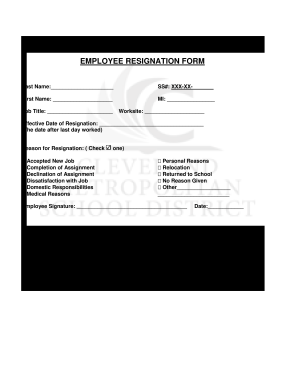
Get Oh Cleveland Metropolitan School District Employee Resignation Form
How it works
-

Open form follow the instructions
-

Easily sign the form with your finger
-

Send filled & signed form or save
How to fill out the OH Cleveland Metropolitan School District Employee Resignation Form online
Filling out the OH Cleveland Metropolitan School District Employee Resignation Form is a crucial step for users planning to resign from their positions. This guide provides comprehensive, step-by-step instructions to help individuals complete the form accurately and efficiently in an online format.
Follow the steps to complete the Employee Resignation Form online
- Click the ‘Get Form’ button to access the Employee Resignation Form and open it for editing.
- Begin by entering your last name in the designated field, followed by your social security number, ensuring that you maintain privacy and security.
- Next, fill in your first name and middle initial. Ensure that these names match the information on your official documents.
- In the following field, indicate your job title within the Cleveland Metropolitan School District to clarify your position.
- Provide the location of your worksite to confirm where you were employed.
- Specify the effective date of your resignation. This date should reflect the first day after your last worked day.
- Select the reason for your resignation by checking the box that corresponds to your situation. If you choose 'Other,' please provide a brief explanation in the space provided.
- Sign your name in the Employee Signature field to validate your resignation.
- Finally, enter the date on which you are completing the form.
- After you have filled out all sections of the form, save your changes. You can then download, print, or share the completed form as required.
Complete your documents online to ensure a smooth resignation process.
The Cuyahoga Heights School District serves the villages of Brooklyn Heights, Cuyahoga Heights, Valley View, and many tuition families.