Loading
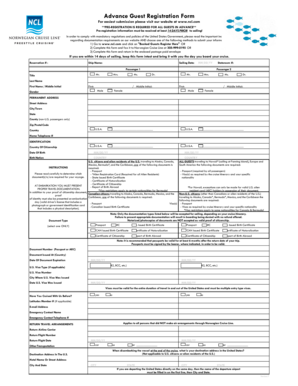
Get Advance Guest Registration Form - Norwegian Cruise Line
How it works
-

Open form follow the instructions
-

Easily sign the form with your finger
-

Send filled & signed form or save
How to fill out the Advance Guest Registration Form - Norwegian Cruise Line online
Filling out the Advance Guest Registration Form for Norwegian Cruise Line is a crucial step to ensure a smooth boarding process. This guide will walk you through each section of the form, providing clear instructions to help you complete it accurately online.
Follow the steps to fill out your registration form online.
- Click ‘Get Form’ button to obtain the form and open it in the editor.
- Fill in your reservation number, ship name, and sailing date in the designated fields. Ensure that the date is formatted as MM/DD/YY.
- For 'Passenger 1' and 'Passenger 2' sections, enter the title, last name, first name, and middle initial as required. Select the appropriate gender for each passenger.
- Provide the permanent address for each passenger, including street address, city/town, state, county (if applicable), zip/postal code, and country.
- Enter the home telephone number for each passenger, ensuring the format meets any specified requirements.
- In the identification section, specify the country of citizenship and date of birth for each passenger. Also, indicate the birth nation and select the appropriate travel documentation required for your voyage.
- Fill in the document type, document number, country of issue, and date of expiration for the relevant identification.
- For U.S. visa details (if applicable), enter the visa type, visa number, city where issued, and date of issue.
- Indicate whether you have cruised with Norwegian Cruise Line before and provide the Latitudes Member number if applicable.
- Fill in the emergency contact name and telephone number, ensuring the contact is not traveling with you.
- Provide details for return travel arrangements, including airline carrier, flight number, flight date, and any other transportation means.
- Lastly, if applicable, provide the destination address in the United States for disembarking at the end of the cruise.
- Once you have filled out all sections, review your information for accuracy. Save your changes, then download, print, or share the form as needed.
Complete your Advance Guest Registration Form online to ensure a smooth sailing experience!
NOTE: if you are having trouble registering or logging into NCL.com, please contact NCL's Technical Support at 1-866-625-1160.