Loading
Get Fl School District Sb 60531 - Hillsborough County 2015-2026
How it works
-

Open form follow the instructions
-

Easily sign the form with your finger
-

Send filled & signed form or save
How to fill out the FL School District SB 60531 - Hillsborough County online
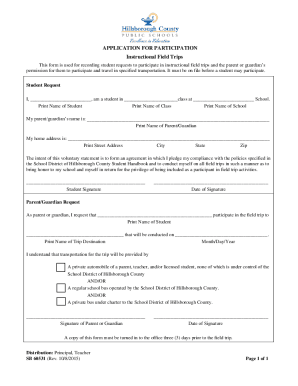
Filling out the FL School District SB 60531 form online is an essential step for students who wish to participate in instructional field trips. This guide will provide a clear and structured approach to completing the form, ensuring that both students and their guardians are well-informed throughout the process.
Follow the steps to successfully complete the form online.
- Click ‘Get Form’ button to obtain the form and open it in the editor.
- Begin by filling out the ‘Student Request’ section. Enter the student's name in the designated field labeled 'Print Name of Student.'
- Next, specify the class name by entering it in the field labeled 'Print Name of Class.'
- Then, provide the school name in the 'Print Name of School' field.
- Continue by entering the parent or guardian's name in the appropriate field. This is essential for parental permission.
- Fill in the home address, including street address, city, state, and zip code in the designated fields provided.
- In the section about compliance, read the statement for understanding and then sign the form in the 'Student Signature' area.
- Beneath the signature, enter the date that the signature is provided.
- Move to the 'Parent/Guardian Request' section. Here, the parent or guardian must enter the student's name again where it states 'Print Name of Student.'
- Next, fill in the name of the trip destination in the corresponding section.
- Provide the date of the trip in the 'Month/Day/Year' format.
- Select the mode of transportation by checking the appropriate options regarding how transportation will be provided during the field trip.
- The parent or guardian must sign in the 'Signature of Parent or Guardian' area.
- Lastly, include the date of the signature below the parent or guardian’s signature.
- Ensure to save any changes made, and if needed, download, print, or share the completed form. Remember to submit a copy of this form to the office at least three days prior to the field trip.
Complete your form online today to ensure your participation in the upcoming field trip!
current electric bill; contract for purchase of home; warranty deed; or. lease agreement.