Loading
Get Animal Friends Claim Form Download
How it works
-

Open form follow the instructions
-

Easily sign the form with your finger
-

Send filled & signed form or save
How to fill out the Animal Friends Claim Form Download online
Completing the Animal Friends Claim Form can seem daunting, but this guide will provide clear instructions to help you efficiently fill out each section. Whether you're a seasoned user or new to claims, you can confidently submit your form online.
Follow the steps to accurately complete your Animal Friends Claim Form.
- Click ‘Get Form’ button to obtain the form and open it in your preferred document viewer or editor.
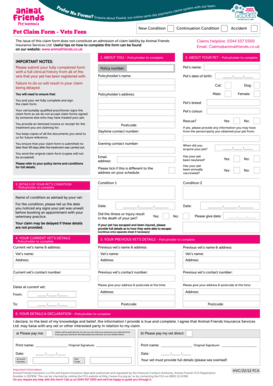
- In the section titled 'About You,' ensure you complete all fields pertaining to your details as the policyholder, including your name, address, and contact numbers.
- Next, move to 'About Your Pet,' where you will provide information about your pet, including their name, date of birth, breed, colour, and whether they have been neutered and vaccinated.
- In the section 'Details of Your Pet’s Condition,' provide information regarding your pet's condition, including how long your pet has shown signs of illness and whether the condition resulted in death.
- Continue to 'Your Current Vet’s Details' and 'Your Previous Vet’s Details,' ensuring that all necessary fields are accurately filled with the relevant information.
- Complete the 'Your Details & Declaration' section. Here, you will declare that the information is accurate and provide your account details for payment.
- Finally, ensure that you review all entries for accuracy, save your changes, and prepare to submit the form via post to Animal Friends Insurance Services Ltd., including all required documents.
Start completing your Animal Friends Claim Form online today for a smooth claims process.
Animal Friends have a long history of paying claims, and they sit pretty well among other providers in regards to the percentage of claims they pay out. In 2020 they paid out 94% of claims submitted to them.