Loading
Get Canada Desjardins Online Brokerage D242 2017-2026
How it works
-

Open form follow the instructions
-

Easily sign the form with your finger
-

Send filled & signed form or save
How to fill out the Canada Desjardins Online Brokerage D242 online
Filling out the Canada Desjardins Online Brokerage D242 form is essential for managing your direct deposit authorizations effectively. This guide will walk you through each step of the process, ensuring that you complete the form accurately and efficiently.
Follow the steps to successfully fill out the form.
- Click ‘Get Form’ button to obtain the form and open it in the editor.
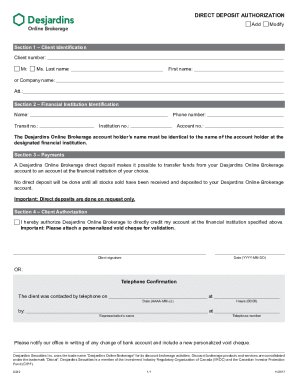
- In Section 1, provide your client identification details. Enter your client number and select your title ('Mr.' or 'Ms.'). Then, fill in your last name, first name, or company name as applicable. If you are using a company name, include the attention line if necessary.
- Move to Section 2 to identify your financial institution. Input the name of your financial institution, along with the phone number, transit number, institution number, and account number. Ensure that the account holder’s name matches the name on your Desjardins Online Brokerage account.
- In Section 3, review the details regarding payments. A Desjardins Online Brokerage direct deposit will allow you to transfer funds to your chosen financial institution, but be aware that no direct deposits will occur until all stocks sold are credited to your account.
- Proceed to Section 4 for client authorization. Check the box to authorize Desjardins Online Brokerage to directly credit your specified financial account. Remember to attach a personalized void cheque for validation.
- Sign the form in the space provided for your client signature and enter the date in the required format (YYYY-MM-DD). If applicable, you may opt for telephone confirmation instead. In this case, enter the date and time the client was contacted, along with the representative's name and telephone number.
- Finally, make sure to review your completed form for accuracy. Once finalized, you can save changes, download, print, or share the form as needed.
Complete your forms online today for a streamlined experience!