Loading
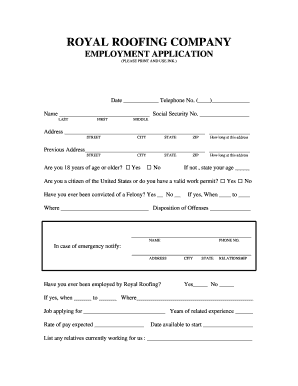
Get Mi Royal Roofing Company Employment Application 2005-2026
How it works
-

Open form follow the instructions
-

Easily sign the form with your finger
-

Send filled & signed form or save
How to fill out the MI Royal Roofing Company Employment Application online
This guide provides step-by-step instructions for users filling out the MI Royal Roofing Company Employment Application online. Each section of the form is covered to ensure a smooth and successful application process.
Follow the steps to complete the application effectively.
- Click ‘Get Form’ button to obtain the form and open it in the editor.
- Begin by entering the date and your telephone number in the designated fields.
- Fill in your full name, including last, first, and middle names.
- Provide your current address including street, city, state, and zip code. Indicate how long you have lived at this address.
- If applicable, provide your previous address, including street, city, state, and zip code, and indicate how long you lived there.
- Confirm whether you are 18 years of age or older and answer the citizenship or work permit question.
- Indicate whether you have ever been convicted of a felony, if applicable, and provide relevant details.
- Enter the name and contact number of an emergency contact along with their address and relationship to you.
- Answer if you have ever been employed by Royal Roofing and provide dates and previous position if applicable.
- Specify the job you are applying for, years of related experience, expected rate of pay, and your available start date.
- List any relatives currently working for the company.
- Indicate any physical limitations that may affect your job performance and explain if necessary.
- Complete the education section with details about your schooling, including years attended and qualifications obtained.
- Provide a chronological employment history for the last three years, including details for each employer.
- Indicate whether the company may contact your present or former employers, specifying any exclusions.
- Read and agree to the statement regarding the accuracy of the information provided and sign the application.
- Review the completed application for any errors, then save your changes, download it, print, or share the form as needed.
Start completing your application online today!