Loading
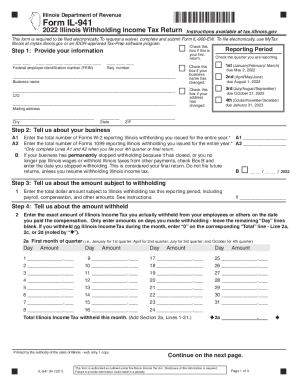
Get Il Dor Il-941 2022-2026
How it works
-

Open form follow the instructions
-

Easily sign the form with your finger
-

Send filled & signed form or save
How to fill out the IL DoR IL-941 online
The IL DoR IL-941 is an essential form for reporting Illinois withholding income tax. This guide provides clear, step-by-step instructions to assist you in accurately filling out the form online, ensuring compliance with state requirements.
Follow the steps to complete the IL-941 online effectively.
- Click ‘Get Form’ button to obtain the form and open it in the editor.
- Provide your information. Enter your business name, Federal Employer Identification Number (FEIN), mailing address, and the reporting period by checking the appropriate quarter box.
- Enter the total number of Forms W-2 and Forms 1099 you issued for Illinois withholding. Complete this only for your final return if applicable.
- Enter the total dollar amount subject to Illinois withholding tax for the reporting period, including payroll and compensation.
- Report the amount of Illinois Income Tax withheld. Fill out the details for each month of the quarter, ensuring to enter the exact amounts withheld on the appropriate days.
- For payments and credits, input the amounts from credits used and total withholding payments made to the Illinois Department of Revenue.
- Calculate the balance by subtracting the total payments from the total amount withheld. Determine if you have a balance due or overpayment.
- Sign the form, entering your signature, date, preparer's information if applicable, and ensure all required fields are completed before submission.
Complete your IL DoR IL-941 online today for a seamless tax reporting experience.
Withholding Formula (Effective Pay Period 05, 2022) Multiply the adjusted gross biweekly wages by the number of pay dates in the tax year to obtain the annual wages. Multiply annual taxable wages by 4.95 percent to determine the annual tax withholding.