Loading
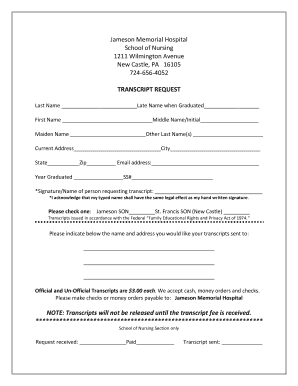
Get Pa Jameson Memorial Hospital School Of Nursing Transcript Request
How it works
-

Open form follow the instructions
-

Easily sign the form with your finger
-

Send filled & signed form or save
How to fill out the PA Jameson Memorial Hospital School Of Nursing Transcript Request online
This guide provides clear and supportive instructions on how to complete the PA Jameson Memorial Hospital School Of Nursing Transcript Request form online. Follow the steps below to ensure your request is filled out accurately and efficiently.
Follow the steps to complete the transcript request form online.
- Press the ‘Get Form’ button to access the transcript request form and open it in your chosen editor.
- Begin filling out your personal information. Input your last name in the designated field, followed by your last name when you graduated, first name, middle name or initial, maiden name, and any other last names you may have.
- Provide your current address, including city, state, and zip code. Be sure to include an email address where you can be contacted.
- Enter the year you graduated and your social security number in the respective fields.
- In the signature field, type your name as it will serve the same legal effect as a handwritten signature. Ensure you acknowledge this with the provided statement.
- Indicate which school you are requesting transcripts from by selecting either Jameson SON or St. Francis SON (New Castle).
- Specify the name and address where you would like your transcripts sent. Make sure this is accurate to avoid delays.
- Review the fee information. Official and unofficial transcripts cost $3.00 each. You will need to indicate your preferred payment method, which includes cash, money orders, or checks made payable to Jameson Memorial Hospital.
- Be aware that transcripts will not be released until the fee is received. Therefore, ensure your payment is ready upon submission.
- Once all sections are completed, review the entire form for accuracy. You can then save the changes, download, print, or share the completed form as required.
Complete your transcript request online today and ensure your educational journey continues smoothly.
This ID is located in the SHP CAS on-screen instructions when ordering electronic transcripts and below the barcode on the Transcript ID Form issued to you by SHP CAS (the barcode is located in the upper right corner of this form).