Loading
Form preview
  • US Legal Forms
  • Other Templates
  • Miscellaneous Forms
  • Multi-State Miscellaneous Forms
  • Nbbi Nb-66 2021

Get Nbbi Nb-66 2021-2026

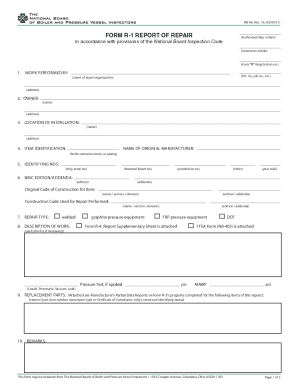
NB66, Rev. 16, (02/04/21)FORM R1 REPORT OF REPAIR(Authorized Rep. initials)in accordance with provisions of the National Board Inspection Code(Inspectors initials)(Form R Registration no.)1.WORK PERFORMED.

How it works

  1. Open form

    Open form follow the instructions

  2. Easily sign form

    Easily sign the form with your finger

  3. Share form

    Send filled & signed form or save

How to fill out the NBBI NB-66 online

Completing the NBBI NB-66 form is essential for reporting repairs in accordance with the National Board Inspection Code. This guide provides a clear and structured approach to assist you in accurately filling out the online form.

Follow the steps to effectively complete the NBBI NB-66 form.

  1. Press ‘Get Form’ button to acquire the form and open it in the editor.
  2. Begin by entering the details for 'Work Performed By', including the purchase order number, job number, and name and address of the repair organization.
  3. Fill in the 'Owner' section with the name and address of the owner of the equipment.
  4. Provide the 'Location of Installation' including the name and address where the equipment is installed.
  5. In the 'Item Identification' section, specify the name of the original manufacturer of the boiler, pressure vessel, or piping.
  6. List the identifying numbers, such as the manufacturer serial number.
  7. Complete the 'NBIC Edition/Addenda' section with the relevant information, including the National Board number, edition, jurisdiction number, year built, and any addenda.
  8. Specify the 'Repair Type' and provide a description of the work performed, including any relevant details about the equipment and repair processes.
  9. If applicable, attach any Replacement Parts documentation, including Manufacturer’s Partial Data Reports or Form R-3’s for the items involved.
  10. Add any necessary remarks that may help clarify information presented in the form.
  11. Complete the 'Certificate of Compliance' and the 'Certificate of Inspection' sections, ensuring that all necessary signatures and dates are included.
  12. Finally, review the filled form for accuracy, save your changes, and choose to download, print, or share the completed document as needed.

Complete your documents online today for a seamless processing experience.

Get form

Experience a faster way to fill out and sign forms on the web. Access the most extensive library of templates available.
Get form

Related content

COMMITTEE MEETING MINUTES - IN.gov
Mar 7, 2019 — (A) Hold a current NBBI commission or equivalent certification....
Learn more
ANSI NBIC NB 23-2 2015.PDF | José Juan Jiménez...
NB-23 2015 NATIONAL BOARD INSPECTION CODE 2015 EDITION DATE OF ISSUE ... Riley UAB...
Learn more

Related links form

Form 2102 Apostille Short Form Realm Sf G 325c Ckc Register

Get This Form Now!

Use professional pre-built templates to fill in and sign documents online faster. Get access to thousands of forms.
Get form
If you believe that this page should be taken down, please follow our DMCA take down processhere.
Get NBBI NB-66
Get form

Form categories

Real Estate
  • Home Sale
  • Deeds
  • Leases
  • Landlord Tenant
  • First Refusal Agreement
  • Lis Pendens
  • View all Real Estate
Business & Commercial
  • Small Business
  • Contracts
  • Construction
  • Employment
  • Limited Liability Company
  • Partnerships
  • View all Business & Commercial
Estate Planning
  • Personal Planning
  • Last Will and Testament
  • Living Trust
  • Power of Attorney
  • Living Will (Healthcare Directive)
  • Probate
  • Trusts
  • Small Estate
  • View all Estate Planning

Other Legal Areas

  • Civil Actions
  • Civil Procedure
  • Animals
  • Affidavits
  • Bill of Sale
  • Oil Gas and Minerals
  • Name Change
  • Other
Family Law
  • Divorce
  • Annulment
  • Adoption
  • Marriage
  • Child Justice
  • View all Family Law
  • Forms Catalog
  • Other Templates

Company

  • About Us
  • Pricing
  • Legal Hub
  • Affiliate Program

Knowledge Base

  • Help Portal
  • Legal Resources
  • Blog
  • Industries
  • Legal Guides
  • Sitemap

Services

  • Notarize
  • Form Selector

Support

  • Contact Us
  • Delete My Account

Products

  • USLegal
  • FormsPass
  • pdfFiller
  • signNow
  • altaFlow
  • DocHub
  • Instapage
Social Media
Call us now toll free:
+1 833 426 79 33
As seen in:
© 2026 US Legal Forms. All rights reserved.
  • Your Privacy Choices
  • Terms of Service
  • Privacy Notice
  • Content Takedown Policy
  • Bug Bounty Program