Loading
Form preview
  • US Legal Forms
  • Other Templates
  • More Forms
  • More Multi-State Forms
  • Canada Elections Ec 20390 2019

Get Canada Elections Ec 20390 2019-2026

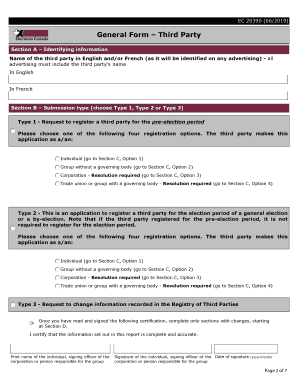
EC 20390 (06/2019)General Form Third PartyGeneral instructions Completing the Form can be filled out electronically and saved with Adobe Professional. Print the form to collect the necessary signatures.

How it works

  1. Open form

    Open form follow the instructions

  2. Easily sign form

    Easily sign the form with your finger

  3. Share form

    Send filled & signed form or save

How to fill out the Canada Elections EC 20390 online

Filling out the Canada Elections EC 20390 form is an important process for third parties wishing to register for election activities in Canada. This guide provides a step-by-step approach to ensure that users can complete the form accurately and efficiently online.

Follow the steps to successfully complete the form

  1. Press the ‘Get Form’ button to download the EC 20390 form and access it for completion.
  2. Begin with Section A to provide the identifying information of the third party. Ensure to fill in both the English and French name exactly as it will be presented in any advertising.
  3. Move to Section B and select the appropriate submission type. Choose from Type 1, Type 2, or Type 3 based on your needs. Be ready to follow specific guidelines in Section C based on your selection.
  4. In Section C, complete the Declaration. Depending on whether you are an individual, a group without a governing body, a corporation, or a trade union, make sure to sign and provide the required information and date.
  5. Proceed to Section D, where you will enter the applicant's information, including name, address, and contact details. This section is crucial for clear communication.
  6. Fill out Section E, providing the address for where communications may be sent, if different from the mailing address provided previously.
  7. In Section F, provide the address where books and records are kept. This can be the same as the previous addresses if applicable.
  8. Complete Section G by registering the financial agent. Make sure the information provided is accurate.
  9. In Section H, the financial agent must affirm their consent to act. Ensure that they sign and date this section.
  10. For those needing an auditor, complete Section I by providing the auditor's information. This section must also involve necessary declarations and signatures.
  11. Lastly, review all sections to ensure completeness and legibility. After confirming that everything is accurate, save your changes, and prepare to print if necessary. Remember, digital signatures are not accepted; ensure to include handwritten signatures where required.

Complete your Canada Elections EC 20390 form online today to ensure timely registration for your political activities.

Get form

Experience a faster way to fill out and sign forms on the web. Access the most extensive library of templates available.
Get form

Related content

FEDERAL REGISTER - GovInfo
Apr 19, 2021 — Airbus Canada Limited Partnership (Type Certificate ... Federal Election...
Learn more
Essays on Party System Institutionalization in...
by JW Morgan · 2015 · Cited by 2 — local electoral institutions can inhibit or...
Learn more
헝가리의 COVID-19 대유행 - 요다위키
During the state of emergency, by-elections and national and local ... Reports in March...
Learn more

Related links form

Reg 51 File C Users 16012 Documents Chs Irs Prf Pdf State Of Iowa Dr 1 Form 2020 Dss Form 2901

Get This Form Now!

Use professional pre-built templates to fill in and sign documents online faster. Get access to thousands of forms.
Get form
If you believe that this page should be taken down, please follow our DMCA take down processhere.
Get Canada Elections EC 20390
Get form
  • Adoption
  • Bankruptcy
  • Contractors
  • Divorce
  • Home Sales
  • Employment
  • Identity Theft
  • Incorporation
  • Landlord Tenant
  • Living Trust
  • Name Change
  • Personal Planning
  • Small Business
  • Wills & Estates
  • Packages A-Z
  • Affidavits
  • Bankruptcy
  • Bill of Sale
  • Corporate - LLC
  • Divorce
  • Employment
  • Identity Theft
  • Internet Technology
  • Landlord Tenant
  • Living Wills
  • Name Change
  • Power of Attorney
  • Real Estate
  • Small Estates
  • Wills
  • All Forms
  • Forms A-Z
  • Other Templates
  • Legal Hub
  • About Us
  • Help Portal
  • Legal Resources
  • Blog
  • Affiliates
  • Contact Us
  • Delete My Account
  • Site Map
  • Industries
  • Forms in Spanish
  • Localized Forms
  • State-specific Forms
  • Forms Kit
  • Real Estate Handbook
  • All Guides
  • Notarize
  • Incorporation services
  • For Consumers
  • For Small Business
  • For Attorneys
  • USLegal
  • FormsPass
  • pdfFiller
  • signNow
  • altaFlow
  • DocHub
  • Instapage
Form Packages
  • Adoption
  • Bankruptcy
  • Contractors
  • Divorce
  • Home Sales
  • Employment
  • Identity Theft
  • Incorporation
  • Landlord Tenant
  • Living Trust
  • Name Change
  • Personal Planning
  • Small Business
  • Wills & Estates
  • Packages A-Z
Form Categories
  • Affidavits
  • Bankruptcy
  • Bill of Sale
  • Corporate - LLC
  • Divorce
  • Employment
  • Identity Theft
  • Internet Technology
  • Landlord Tenant
  • Living Wills
  • Name Change
  • Power of Attorney
  • Real Estate
  • Small Estates
  • Wills
  • All Forms
  • Forms A-Z
  • Other Templates
Customer Service
  • Legal Hub
  • About Us
  • Help Portal
  • Legal Resources
  • Blog
  • Affiliates
  • Contact Us
  • Delete My Account
  • Site Map
  • Industries
  • Forms in Spanish
  • Localized Forms
  • State-specific Forms
  • Forms Kit
Legal Guides
  • Real Estate Handbook
  • All Guides
Prepared for you
  • Notarize
  • Incorporation services
Our Customers
  • For Consumers
  • For Small Business
  • For Attorneys
Our Sites
  • USLegal
  • FormsPass
  • pdfFiller
  • signNow
  • altaFlow
  • DocHub
  • Instapage
Social Media
Call us now toll free:
+1 833 426 79 33
As seen in:
© Copyright 1999-2026 airSlate Legal Forms, Inc. 17 Station Street, Ste. 203, Brookline, MA 02445
  • Your Privacy Choices
  • Terms of Service
  • Privacy Notice
  • Content Takedown Policy
  • Bug Bounty Program