Loading
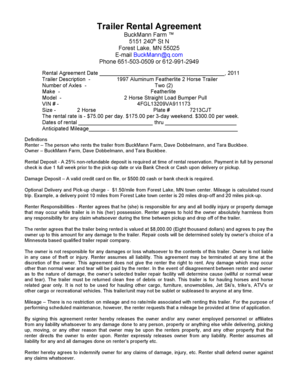
Get Mn Buckmann Farm Trailer Rental Agreement 2011-2026
How it works
-

Open form follow the instructions
-

Easily sign the form with your finger
-

Send filled & signed form or save
How to fill out the MN Buckmann Farm Trailer Rental Agreement online
This guide provides a thorough overview of how to complete the MN Buckmann Farm Trailer Rental Agreement online. It is designed to assist users of all levels in understanding the components of the form and ensuring accurate completion.
Follow the steps to effectively complete the agreement.
- Click the ‘Get Form’ button to access the rental agreement document in the online editor.
- Fill in the rental agreement date. Enter today's date or the date when the rental period begins in the designated field.
- Describe the trailer by confirming details provided, such as the model, year, and size (e.g., 1997 Aluminum Featherlite 2 Horse Trailer). Ensure accuracy in the trailer description.
- Record the rental dates. Indicate the start and end dates of the rental period in the appropriate fields.
- Estimate anticipated mileage. Fill in the expected mileage that will be incurred during the rental period.
- Provide your name, address, and contact information. Ensure to print legibly and include all required details.
- Attach the necessary documentation. Include a copy of your driver’s license, vehicle registration, and insurance card. In the form sections, indicate that these attachments are included.
- Provide the name of the principal driver, and ensure their information is complete and accurate.
- Review the information for accuracy. Double-check all fields to ensure they are filled out correctly.
- Sign the agreement. By signing, you confirm that all information is true and you have reviewed the towing instructions.
- Finalize the process by saving, downloading, or printing the completed form as necessary. Make sure to keep a copy for your records.
Start filling out your MN Buckmann Farm Trailer Rental Agreement online today!