Loading
Get Ct Kidsense Therapy Group Credit Card Authorization 2020-2026
How it works
-

Open form follow the instructions
-

Easily sign the form with your finger
-

Send filled & signed form or save
How to fill out the CT Kidsense Therapy Group Credit Card Authorization online
This guide provides clear, step-by-step instructions on how to complete the CT Kidsense Therapy Group Credit Card Authorization form online. By following these directions, you will ensure that all necessary information is accurately submitted.
Follow the steps to complete the authorization form online.
- Press the ‘Get Form’ button to obtain the credit card authorization form and open it in the online document editor.
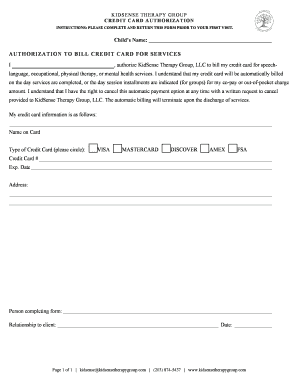
- Begin filling out the form by entering the child's name in the designated space. This is located at the top of the form.
- In the next section, find the statement that begins with 'I authorize KidSense Therapy Group, LLC.' Fill in your name where indicated. This grants permission for billing to take place.
- Next, specify your credit card information. Provide the name on the card, select the type of credit card by circling either VISA, MASTERCARD, DISCOVER, AMEX, or FSA.
- Enter your credit card number and the expiration date in the respective fields below the card type selection.
- Fill in your billing address accurately in the space provided. This information is crucial for proper processing of the payment.
- Indicate the person completing the form and state their relationship to the child by filling out the respective fields.
- Finally, write the date of form completion to ensure it is clear when the authorization was provided.
- Review all entries for accuracy. Once confirmed, save your changes, and you can choose to download, print, or share the completed form as needed.
Complete your authorization form online today to ensure a smooth process for your therapy services.