Loading
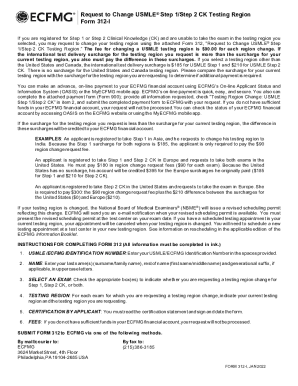
Get Ecfmg 312-i 2022-2026
How it works
-

Open form follow the instructions
-

Easily sign the form with your finger
-

Send filled & signed form or save
How to fill out the ECFMG 312-I online
This guide provides a comprehensive overview of how to complete the ECFMG 312-I form online for changing your USMLE testing region. Following these step-by-step instructions will ensure that you fill out the form accurately and efficiently.
Follow the steps to complete the ECFMG 312-I form online.
- Click ‘Get Form’ button to obtain the form and open it in the editor.
- Enter your USMLE/ECFMG identification number in the designated spaces provided on the form.
- Fill in your name, ensuring to include your last name, first name, middle name, and any generational suffix in uppercase letters.
- Indicate which examination you are requesting a testing region change for by checking the appropriate box for either Step 1, Step 2 CK, or both.
- For each exam you're changing, specify your current testing region and the new testing region you are requesting.
- Read the certification statement, ensuring you understand the requirements, then sign and date the form.
- Check if you have sufficient funds in your ECFMG financial account to cover the region change fee and any applicable surcharges.
- Submit the completed form via the appropriate method, such as by mail or fax, to ECFMG.
- After submission, keep an eye out for an email notification from ECFMG about your revised scheduling permit.
Complete your ECFMG 312-I form online today for a smooth experience in changing your testing region.
Related links form
you are expected to graduate from the medical school program six or more years after the date you first passed Step 1 and/or Step 2; and. you are otherwise eligible to retake the examination.