Loading
Form preview
  • US Legal Forms
  • Other Templates
  • More Forms
  • More Multi-State Forms
  • Www.signnow.comfill-and-sign-pdf-form74752iowa Retail Permit Application For ...

Get Www.signnow.comfill-and-sign-pdf-form74752iowa Retail Permit Application For ...

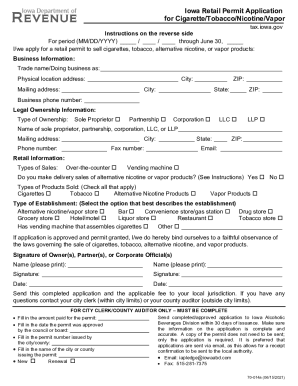
Iowa Retail Permit Application for Cigarette/Tobacco/Nicotine/Vapor tax.iowa.govInstructions on the reverse side For period (MM/DD/YYYY) / / through June 30, I/we apply for a retail permit to sell.

How it works

  1. Open form

    Open form follow the instructions

  2. Easily sign form

    Easily sign the form with your finger

  3. Share form

    Send filled & signed form or save

How to fill out the Iowa Retail Permit Application for Cigarette, Tobacco, Nicotine, and Vapor products online

Filling out the Iowa Retail Permit Application is essential for businesses seeking to sell cigarettes, tobacco, alternative nicotine, or vapor products. This guide provides a clear, step-by-step approach to completing the form online, ensuring that users understand each section and field.

Follow the steps to accurately complete your application.

  1. Click ‘Get Form’ button to obtain the form and open it in the editor.
  2. Begin by entering the period the application covers (MM/DD/YYYY) in the designated fields.
  3. Provide your business information. Fill in the trade name/doing business as (DBA), physical location address, and mailing address, including city and ZIP code.
  4. Fill in your business phone number in the provided section.
  5. Indicate the type of ownership of your business by checking the appropriate box: Sole Proprietor, Partnership, Corporation, LLC, or LLP.
  6. Supply the legal ownership information by entering the name of the business owner or entity, mailing address, phone number, fax number, and email.
  7. Specify your retail information. Check the boxes indicating the types of sales your business will conduct (e.g., over-the-counter, vending machine).
  8. Indicate if you make delivery sales of alternative nicotine or vapor products and check all applicable types of products sold.
  9. Select the type of establishment that best describes your business from the provided options.
  10. Sign the application by printing your name and providing your signature, along with the date.
  11. Review the completed application for accuracy and ensure all fields are filled in correctly before submission.
  12. Submit the completed application and the applicable fee to your local jurisdiction, either the city clerk or county auditor.
  13. After submitting, retain a copy of your application for your records.

Complete your Iowa Retail Permit Application online today to ensure compliance and expedite your business setup.

Get form

Experience a faster way to fill out and sign forms on the web. Access the most extensive library of templates available.

Related links form

New York Interest Rate Lock Commitment What Is It Form Va Not Inspected Acknowledgement Enrolment Form For Hostel Admission - FIITJEE Divemaster Discover Scuba Diving Internship Completion Form

Questions & Answers

Get answers to your most pressing questions about US Legal Forms API.

Contact support

How to e-sign a document. Click the link in the document that tells you where to sign. A pop-up window will open so you can create your electronic signature in the signature field. Type your name, sign with the computer's mouse, or upload an image of your signature. ... Click Apply to add your signature to the document.

Acrobat Sign Solutions 30 days free. Call 800-685-4192 for pricing. Popular features: Sign and collect signatures.

Xodo provides a free PDF signing tool for you to create and add your digital signature and initials onto a PDF. Simply select the file you want to sign, and use the tool to complete the whole signing process.

Of course! You'll usually be able to create two free signatures per day, but you can also try out eSign totally unrestricted with a 7-day free trial. If you love it, you can sign up for an account to get unlimited access to eSign and 20 other PDF tools that'll change the way you get work done.

Follow these easy steps to fill and sign a PDF using an e-signature: Click the Select a file button above, or drag and drop a file into the drop zone. Select the PDF document you want to fill in and sign. After Acrobat uploads the file, use the editing tools to fill out the form.

Sign documents online for free in 3 easy steps Upload your document. It's easy to upload Word, PDF and other common document formats from your computer or file-sharing systems like Google Drive and OneDrive. ... Add signing fields. ... Sign it and share it.

Follow the step-by-step guidelines to what is signnow online: Upload a document. Once it's uploaded, it'll open in the online editor. Select My signature. Choose one of three options to generate a signature: draw, type or upload an image of a handwritten one. Once you create a signature click Ok.

0:08 1:32 How to Add a Signature from Your Mobile Device with signNow? YouTube Start of suggested clip End of suggested clip You can create one by typing or drawing and saving it to your account. Finally apply your signature.MoreYou can create one by typing or drawing and saving it to your account. Finally apply your signature. And it will instantly appear on your document.

2:25 4:05 Getting Started with signNow - YouTube YouTube Start of suggested clip End of suggested clip Folder. Use document groups if you need to bundle documents. Together send a group of documents to aMoreFolder. Use document groups if you need to bundle documents. Together send a group of documents to a single signer or create citing steps for multiple signers across multiple.

How to Add a Signature to a PDF without Adobe in Browser. With the use of a web browser, you can sign a PDF using the Smallpdf online application. Initially, access the "Sign PDF" option on the Smallpdf website. Upload the PDF file you wish to sign next.

Get This Form Now!

Use professional pre-built templates to fill in and sign documents online faster. Get access to thousands of forms.
If you believe that this page should be taken down, please follow our DMCA take down processhere.
Get Www.signnow.comfill-and-sign-pdf-form74752Iowa Retail Permit Application For ...

Form categories

Real Estate
  • Home Sale
  • Deeds
  • Leases
  • Landlord Tenant
  • First Refusal Agreement
  • Lis Pendens
  • View all Real Estate
Business & Commercial
  • Small Business
  • Contracts
  • Construction
  • Employment
  • Limited Liability Company
  • Partnerships
  • View all Business & Commercial
Estate Planning
  • Personal Planning
  • Last Will and Testament
  • Living Trust
  • Power of Attorney
  • Living Will (Healthcare Directive)
  • Probate
  • Trusts
  • Small Estate
  • View all Estate Planning

Other Legal Areas

  • Civil Actions
  • Civil Procedure
  • Animals
  • Affidavits
  • Bill of Sale
  • Oil Gas and Minerals
  • Name Change
  • Other
Family Law
  • Divorce
  • Annulment
  • Adoption
  • Marriage
  • Child Justice
  • View all Family Law
  • Forms Catalog
  • Other Templates

Company

  • About Us
  • Pricing
  • Legal Hub
  • Affiliate Program

Knowledge Base

  • Help Portal
  • Legal Resources
  • Blog
  • Industries
  • Legal Guides
  • Sitemap

Services

  • Notarize
  • Form Selector

Support

  • Contact Us
  • Delete My Account

Products

  • USLegal
  • FormsPass
  • pdfFiller
  • signNow
  • altaFlow
  • DocHub
  • Instapage
Social Media
Call us now toll free:
+1 833 426 79 33
As seen in:
© 2026 US Legal Forms. All rights reserved.
  • Your Privacy Choices
  • Terms of Service
  • Privacy Notice
  • Content Takedown Policy
  • Bug Bounty Program
Www.signnow.comfill-and-sign-pdf-form74752Iowa Retail Permit Application For ...
This form is available in several versions.
Select the version you need from the drop-down list below.
2024 IA 70-014
Select form
  • 2024 IA 70-014
  • 2017 IA 70-014
  • 2016 IA 70-014a
  • Www.signnow.comfill-and-sign-pdf-form74752Iowa Retail Permit Application For ...
Select form