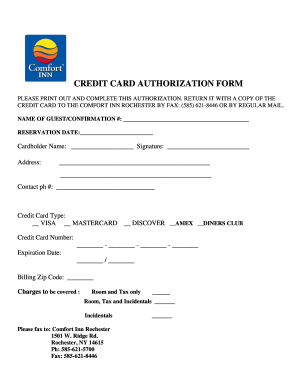
Get Comfort Inn Rochester Credit Card Authorization
How it works
-

Open form follow the instructions
-

Easily sign the form with your finger
-

Send filled & signed form or save
How to fill out the Comfort Inn Rochester Credit Card Authorization online
Filling out the Comfort Inn Rochester Credit Card Authorization form online is a straightforward process that ensures your reservation is secured. This guide provides detailed instructions on how to accurately complete each section of the form, making your experience smooth and efficient.
Follow the steps to complete the authorization form accurately.
- Press the ‘Get Form’ button to access the Credit Card Authorization form and open it in your preferred editing tool.
- In the first section, enter the name of the guest and their confirmation number. This information establishes the connection between the credit card and the reservation.
- Next, specify the reservation date in the provided field. This date should match the date of your booking to avoid any discrepancies.
- Provide the cardholder's name. This should be the full name as it appears on the credit card. Ensure the spelling is accurate.
- Sign the authorization form in the designated signature field. This signature must match the cardholder's signature on the credit card.
- Fill in the cardholder's address, including street, city, state, and zip code. This information is essential for billing purposes.
- Enter the contact phone number in the specified field. This allows the hotel to reach out if there are any questions regarding the authorization.
- Select the type of credit card being used by checking the appropriate box—VISA, MasterCard, Discover, American Express, or Diners Club.
- Input the credit card number in the designated fields. Make sure to divide the number correctly, separating it into the four groups of digits.
- Specify the expiration date of the credit card. Use the format provided to avoid errors.
- Include the billing zip code associated with the credit card. This information is often used for verification.
- Indicate the charges to be covered. Choose either 'Room and Tax only' or 'Room, Tax and Incidentals.' Be sure to mark your selection clearly.
- Once you have filled out all sections, you may save the changes, download a copy for your records, print the form, or share it as instructed for submission.
Complete the Comfort Inn Rochester Credit Card Authorization form online today to secure your reservation.
To give someone authorization to use your credit card, you can provide a written letter or complete a credit card authorization form. Ensure you include your details, the name of the authorized individual, and the purpose for which they can use your card. This formal procedure is crucial for obtaining a smooth Comfort Inn Rochester Credit Card Authorization and securing your transactions.