Loading
Form preview
  • US Legal Forms
  • Other Templates
  • More Forms
  • More Multi-State Forms
  • Machining Sheet Exit Device Interactive.pdf - Doormerica.com

Get Machining Sheet Exit Device Interactive.pdf - Doormerica.com

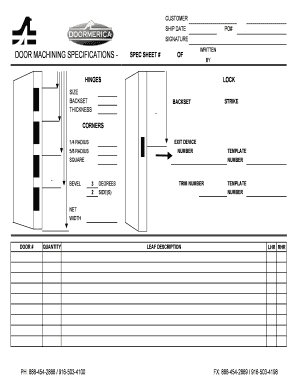
CUSTOMER PO# SHIP DATE PO# SIGNATURE DOOR MACHINING SPECIFICATIONS SPEC SHEET # OF WRITTEN LOCK HINGES SIZE BACKSET THICKNESS BY BACKSET STRIKE CORNERS 1/4 RADIUS EXIT DEVICE 5/8 RADIUS SQUARE NUMBER.

How it works

  1. Open form

    Open form follow the instructions

  2. Easily sign form

    Easily sign the form with your finger

  3. Share form

    Send filled & signed form or save

How to fill out the Machining Sheet Exit Device Interactive.pdf - Doormerica.com online

Filling out the Machining Sheet Exit Device Interactive.pdf is a crucial part of ensuring that your exit devices are correctly ordered and machined to specifications. This guide provides step-by-step instructions to help users complete the form accurately and efficiently.

Follow the steps to complete the online form.

  1. Click the ‘Get Form’ button to access the document and open it in an interactive editor.
  2. Begin by filling in the 'Customer' field with your name or company name as the responsible party for the order.
  3. Enter the 'PO#' (Purchase Order Number), which helps track the order within your systems.
  4. Specify the 'Ship Date', indicating when you expect the products to be delivered.
  5. Sign in the 'Signature' field, indicating your approval and agreement to the order specifications.
  6. In the 'Door Machining Specifications' section, fill out the 'Spec Sheet #' if applicable, along with the 'Lock Size', 'Backset', and 'Thickness' of the door.
  7. Indicate the type of 'Hinges' required by entering the necessary information under that heading.
  8. Provide details about the 'Strike' including the kind of corners needed, such as '1/4 Radius' or '5/8 Radius'.
  9. Document the 'Exit Device' specifications clearly in the appropriate fields, detailing the template number and any specific requirements.
  10. Finally, in the 'Leaf Description' area, indicate the direction (LHR for Left Hand Reverse or RHR for Right Hand Reverse) as applicable.
  11. Once all fields are filled, users can review the information for accuracy, then save changes, download, print, or share the completed form as needed.

Complete your documents online today to ensure accurate and timely processing.

Get form

Experience a faster way to fill out and sign forms on the web. Access the most extensive library of templates available.
Get form

Related content

Technical Specifications - Hallandale Beach
Drawings on sheets at least 12 by 18 inches, but no larger than 24 by 36 inches. 3. Submit...
Learn more

Related links form

Offense Report 2009 Minority Scholarship Application ICICI Prudential Regular Savings Fund Sdatawp51Agency Complaints269979 26990078 Bb - Bell County

Get This Form Now!

Use professional pre-built templates to fill in and sign documents online faster. Get access to thousands of forms.
Get form
If you believe that this page should be taken down, please follow our DMCA take down processhere.
Get Machining Sheet Exit Device Interactive.pdf - Doormerica.com
Get form

Form categories

Real Estate
  • Home Sale
  • Deeds
  • Leases
  • Landlord Tenant
  • First Refusal Agreement
  • Lis Pendens
  • View all Real Estate
Business & Commercial
  • Small Business
  • Contracts
  • Construction
  • Employment
  • Limited Liability Company
  • Partnerships
  • View all Business & Commercial
Estate Planning
  • Personal Planning
  • Last Will and Testament
  • Living Trust
  • Power of Attorney
  • Living Will (Healthcare Directive)
  • Probate
  • Trusts
  • Small Estate
  • View all Estate Planning

Other Legal Areas

  • Civil Actions
  • Civil Procedure
  • Animals
  • Affidavits
  • Bill of Sale
  • Oil Gas and Minerals
  • Name Change
  • Other
Family Law
  • Divorce
  • Annulment
  • Adoption
  • Marriage
  • Child Justice
  • View all Family Law
  • Forms Catalog
  • Other Templates

Company

  • About Us
  • Pricing
  • Legal Hub
  • Affiliate Program

Knowledge Base

  • Help Portal
  • Legal Resources
  • Blog
  • Industries
  • Legal Guides
  • Sitemap

Services

  • Notarize
  • Form Selector

Support

  • Contact Us
  • Delete My Account

Products

  • USLegal
  • FormsPass
  • pdfFiller
  • signNow
  • altaFlow
  • DocHub
  • Instapage
Social Media
Call us now toll free:
+1 833 426 79 33
As seen in:
© 2026 US Legal Forms. All rights reserved.
  • Your Privacy Choices
  • Terms of Service
  • Privacy Notice
  • Content Takedown Policy
  • Bug Bounty Program