Loading
Form preview
  • US Legal Forms
  • Other Templates
  • Miscellaneous Forms
  • Multi-State Miscellaneous Forms
  • No Sparebank Form For International Payments 2012

Get No Sparebank Form For International Payments 2012-2026

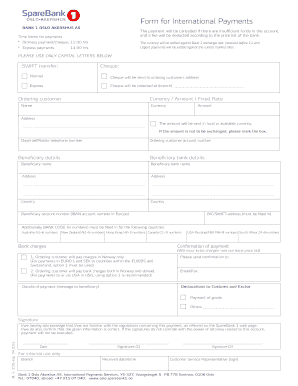
Form for International Payments The payment will be cancelled if there are insufcient funds in the account, and a fee will be deducted according to the price list of the bank. Time frame for payments.

How it works

  1. Open form

    Open form follow the instructions

  2. Easily sign form

    Easily sign the form with your finger

  3. Share form

    Send filled & signed form or save

How to fill out the NO SpareBank Form for International Payments online

Filling out the NO SpareBank Form for International Payments online is a straightforward process that enables users to make secure international transactions. This guide will walk you through each step to ensure that you complete the form accurately and efficiently.

Follow the steps to complete the form successfully.

  1. Click ‘Get Form’ button to obtain the form and open it for editing.
  2. Begin by filling out the 'Ordering Customer' section. Provide your full name, address, daytime/mobile telephone number, and your account number. Ensure that all information is presented in capital letters.
  3. In the 'Beneficiary details' section, input the beneficiary's name, address, country, and account details. Include the beneficiary's account number (IBAN) and BIC/SWIFT address. If applicable, fill in the additional bank code for certain countries.
  4. Specify the payment details including the currency and amount. If you do not wish to exchange the currency, ensure to mark the relevant box.
  5. In the 'Bank charges' section, choose whether you will cover the charges in Norway only or both in Norway and abroad.
  6. Provide details regarding the nature of the payment in the 'Declarations to Customs and Excise' section and include any messages for the beneficiary, if necessary.
  7. Sign the form to confirm your acknowledgment of the regulations concerning this payment and to verify that the provided information is accurate. Include the date and all required signatures.
  8. Once you have completed the form, you can save changes, download the form, print it, or share it as needed.

Complete your documents online today for a seamless payment experience.

Get form

Experience a faster way to fill out and sign forms on the web. Access the most extensive library of templates available.
Get form

Related content

0001752724-23-074193.txt
... FORM TYPE: NPORT-P SEC ACT: 1940 Act SEC FILE NUMBER: 811-23580 FILM NUMBER...
Learn more
Norwegian State Finance Fund (GFC) - EliScholar
by N Leonard · 2021 — Only Norwegian banks and foreign-owned bank subsidiaries (though...
Learn more
Dell PowerVault 775N Systems Service Manual
1. Ask the user to back up any data on the hard drive if the system's condition permits...
Learn more

Related links form

Baptism Form New Patient Registration Form - NorthStar Dental Clinic Bail Bond Recovery Contract - Washington Department Of Licensing - Dol Wa Helping Children Who Witness Domestic Violence A 2020

Questions & Answers

Get answers to your most pressing questions about US Legal Forms API.

Contact support

Making an international bank payment is a straightforward process. Begin by ensuring you have the necessary details, such as the recipient’s name, swift code, and other banking information. With the understanding that there is NO SpareBank Form for International Payments, you can make these payments directly through your bank's online system, eliminating the need for paper forms. This modern approach allows for quick and secure transactions worldwide.

To fill out an international bank transfer form, start by entering your details and the recipient's information accurately. Include critical elements like the recipient's name, address, account number, and swift code. Luckily, there is NO SpareBank Form for International Payments, which makes this task easier as you can often complete it online without needing formal paperwork. Double-check all entries to ensure a smooth transfer.

Yes, your bank account can typically receive international payments if your bank supports such transactions. Ensure that you provide the sender with your correct bank account details, including your swift code. It is important to note that even though there is NO SpareBank Form for International Payments, your bank may require some specific information to facilitate the transfer. Always check with your bank to confirm any requirements.

To receive international payments, you need to provide the sender with your bank account details, including your International Bank Account Number (IBAN) and SWIFT/BIC code. It's essential to ensure that the sender's bank can send funds internationally and follows any required protocols. By using the right forms, such as the NO SpareBank Form for International Payments, you can streamline the process and ensure all necessary information is captured. This will help you receive payments quickly and securely.

The SWIFT code for Sparebank Norway varies depending on the specific branch or location. It is essential to verify the correct code with your bank before making an international transfer. Providing the right SWIFT code ensures that your funds reach the intended destination without any issues. For more guidance on standards and forms related to your payments, US Legal can help with your NO SpareBank Form for International Payments.

Filling out a bank transfer form requires careful attention to detail. Begin by entering your personal information, such as your name and account number. Then, input the recipient's details and the transfer amount. If you are unsure about any part of the form, US Legal offers guidance to help you through the process of completing the NO SpareBank Form for International Payments.

To make an international payment through your bank, visit your local branch, or access your bank's online banking platform. After logging in, look for the international payment or wire transfer section. Fill out the required information, including the recipient's bank and account details. If you encounter difficulties, US Legal provides resources that can assist you with completing the NO SpareBank Form for International Payments.

To fill out an international wire transfer form, start by obtaining the form from your bank or financial service. You will need to provide details such as the recipient's name, account number, bank name, and bank address. Additionally, include the amounts you wish to send and the currency type. If you're unsure about the process, consider using the US Legal feature platform to guide you through filling out your NO SpareBank Form for International Payments.

To fill out an international wire transfer, begin by gathering the necessary information such as your bank details, the recipient’s name, and their bank account info. Highlight the amount you wish to transfer and check that you have the correct currency code. Using the NO SpareBank Form for International Payments can streamline this process, making it clearer and easier to complete.

The format for an international transfer typically requires specific details such as the recipient's name, account number, and SWIFT or IBAN code. Depending on the platform, different formats may apply, so it's critical to follow the instructions provided. Utilizing the NO SpareBank Form for International Payments can guide you in structuring your transfer correctly.

Get This Form Now!

Use professional pre-built templates to fill in and sign documents online faster. Get access to thousands of forms.
Get form
If you believe that this page should be taken down, please follow our DMCA take down processhere.
Get NO SpareBank Form for International Payments
Get form
  • Adoption
  • Bankruptcy
  • Contractors
  • Divorce
  • Home Sales
  • Employment
  • Identity Theft
  • Incorporation
  • Landlord Tenant
  • Living Trust
  • Name Change
  • Personal Planning
  • Small Business
  • Wills & Estates
  • Packages A-Z
  • Affidavits
  • Bankruptcy
  • Bill of Sale
  • Corporate - LLC
  • Divorce
  • Employment
  • Identity Theft
  • Internet Technology
  • Landlord Tenant
  • Living Wills
  • Name Change
  • Power of Attorney
  • Real Estate
  • Small Estates
  • Wills
  • All Forms
  • Forms A-Z
  • Other Templates
  • Legal Hub
  • About Us
  • Help Portal
  • Legal Resources
  • Blog
  • Affiliates
  • Contact Us
  • Delete My Account
  • Site Map
  • Industries
  • Forms in Spanish
  • Localized Forms
  • State-specific Forms
  • Forms Kit
  • Real Estate Handbook
  • All Guides
  • Notarize
  • Incorporation services
  • For Consumers
  • For Small Business
  • For Attorneys
  • USLegal
  • FormsPass
  • pdfFiller
  • signNow
  • altaFlow
  • DocHub
  • Instapage
Form Packages
  • Adoption
  • Bankruptcy
  • Contractors
  • Divorce
  • Home Sales
  • Employment
  • Identity Theft
  • Incorporation
  • Landlord Tenant
  • Living Trust
  • Name Change
  • Personal Planning
  • Small Business
  • Wills & Estates
  • Packages A-Z
Form Categories
  • Affidavits
  • Bankruptcy
  • Bill of Sale
  • Corporate - LLC
  • Divorce
  • Employment
  • Identity Theft
  • Internet Technology
  • Landlord Tenant
  • Living Wills
  • Name Change
  • Power of Attorney
  • Real Estate
  • Small Estates
  • Wills
  • All Forms
  • Forms A-Z
  • Other Templates
Customer Service
  • Legal Hub
  • About Us
  • Help Portal
  • Legal Resources
  • Blog
  • Affiliates
  • Contact Us
  • Delete My Account
  • Site Map
  • Industries
  • Forms in Spanish
  • Localized Forms
  • State-specific Forms
  • Forms Kit
Legal Guides
  • Real Estate Handbook
  • All Guides
Prepared for you
  • Notarize
  • Incorporation services
Our Customers
  • For Consumers
  • For Small Business
  • For Attorneys
Our Sites
  • USLegal
  • FormsPass
  • pdfFiller
  • signNow
  • altaFlow
  • DocHub
  • Instapage
Social Media
Call us now toll free:
+1 833 426 79 33
As seen in:
© Copyright 1999-2026 airSlate Legal Forms, Inc. 17 Station Street, Ste. 203, Brookline, MA 02445
  • Your Privacy Choices
  • Terms of Service
  • Privacy Notice
  • Content Takedown Policy
  • Bug Bounty Program