Get Fl Permit Extension Request - City Of Plantation 2009-2026
How it works
-

Open form follow the instructions
-

Easily sign the form with your finger
-

Send filled & signed form or save
How to fill out the FL Permit Extension Request - City of Plantation online
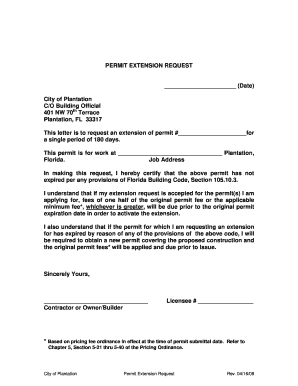
Completing the FL Permit Extension Request for the City of Plantation is a straightforward process that allows you to extend your permit for an additional 180 days. This guide will walk you through each section of the form to ensure you fill it out correctly and efficiently.
Follow the steps to complete your permit extension request online.
- Press the ‘Get Form’ button to access the document and open it in your preferred online editor.
- Input the current date at the top of the form to ensure your request is timely.
- In the section marked 'permit #', fill in the specific permit number you wish to extend.
- Provide the job address where the permitted work is being conducted in the designated area.
- Read the certification statement carefully, assuring that the permit is still valid under Florida Building Code, and confirm your understanding of the required fees for activating the extension.
- Sign the document to affirm your request, adding your name and relevant title (contractor or owner/builder) under the signature line.
- Include your license number in the space provided to verify your credentials.
- After completing all fields, you can save changes, download, print, or share the completed form as needed.
Begin your permit extension process online today!
Looking up a permit in Florida is straightforward; you can usually find this information through the state or local building department's website. These platforms typically offer online databases where you can enter your permit number or address to see details. If you need additional help, consider using the FL Permit Extension Request - City of Plantation if your permit is close to expiring. Utilize these resources to stay updated on your project’s requirements.