Loading
Form preview
  • US Legal Forms
  • Other Templates
  • Independent Agency Forms
  • Independent Agency OPM Forms
  • Opm Of 306 2019

Get Opm Of 306 2019-2026

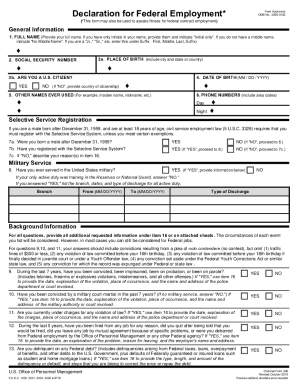
Declaration for Federal Employment*Form Approved: OMB No. 32060182(*This form may also be used to assess fitness for federal contract employment)Instructions The information collected on this form.

How it works

  1. Open form

    Open form follow the instructions

  2. Easily sign form

    Easily sign the form with your finger

  3. Share form

    Send filled & signed form or save

How to fill out the OPM OF 306 online

Filling out the OPM OF 306, also known as the Declaration for Federal Employment, is a crucial step in the federal hiring process. This guide provides clear, step-by-step instructions to help you complete this form accurately and efficiently.

Follow the steps to complete the OPM OF 306 online.

  1. Click ‘Get Form’ button to access the OPM OF 306 form and open it in your online editor.
  2. Fill in your full name in the specified format. If applicable, include initial(s) and suffixes (e.g., Jr., Sr.).
  3. Enter your Social Security Number in the designated field.
  4. Indicate your place of birth, specifying city and state or country.
  5. Confirm your citizenship status by selecting 'YES' or 'NO'. If 'NO', provide your country of citizenship.
  6. Input your date of birth in the format MM/DD/YYYY.
  7. List any other names you have ever used, such as maiden names or nicknames.
  8. Provide your contact numbers, including area codes for both day and night.
  9. Answer the Selective Service Registration questions if applicable, detailing your registration status.
  10. Respond to questions regarding military service and provide details if you served.
  11. Answer questions about your background information, including any criminal convictions and employment history.
  12. Complete item 16, providing additional information as requested on attached sheets if necessary.
  13. Review and certify the accuracy of your information before signing in the certifying section.
  14. Once completed, you can save changes, download, print, or share the form as needed.

Complete your OPM OF 306 online today for a smooth application process.

Get form

Experience a faster way to fill out and sign forms on the web. Access the most extensive library of templates available.
Get form

Related content

Optional Forms - OPM
OF 306, Declaration for Federal Employment (Fillable PDF file) [97.75 KB]. OF 311...
Learn more
OF0306 Form - Federal Government Jobs
Notice OPM/GOVT-1, General Personnel Records. This system allows ... Optional Form 306...
Learn more
internally regulated generators - AZSLIDE.COM
Testing Policy. Before any generator is shipped from the factory, it is fully checked for...
Learn more

Related links form

Employee Grievance - Department Of Emergency & Military Affairs Scope Of Work Standard Comments Applicant's Benefits Calculation Worksheet - Arizona Division Of ... Acknowledge Appointment To The Position Of - Azdema

Get This Form Now!

Use professional pre-built templates to fill in and sign documents online faster. Get access to thousands of forms.
Get form
If you believe that this page should be taken down, please follow our DMCA take down processhere.
Get OPM OF 306
Get form

Form categories

Real Estate
  • Home Sale
  • Deeds
  • Leases
  • Landlord Tenant
  • First Refusal Agreement
  • Lis Pendens
  • View all Real Estate
Business & Commercial
  • Small Business
  • Contracts
  • Construction
  • Employment
  • Limited Liability Company
  • Partnerships
  • View all Business & Commercial
Estate Planning
  • Personal Planning
  • Last Will and Testament
  • Living Trust
  • Power of Attorney
  • Living Will (Healthcare Directive)
  • Probate
  • Trusts
  • Small Estate
  • View all Estate Planning

Other Legal Areas

  • Civil Actions
  • Civil Procedure
  • Animals
  • Affidavits
  • Bill of Sale
  • Oil Gas and Minerals
  • Name Change
  • Other
Family Law
  • Divorce
  • Annulment
  • Adoption
  • Marriage
  • Child Justice
  • View all Family Law
  • Forms Catalog
  • Other Templates

Company

  • About Us
  • Pricing
  • Legal Hub
  • Affiliate Program

Knowledge Base

  • Help Portal
  • Legal Resources
  • Blog
  • Industries
  • Legal Guides
  • Sitemap

Services

  • Notarize
  • Form Selector

Support

  • Contact Us
  • Delete My Account

Products

  • USLegal
  • FormsPass
  • pdfFiller
  • signNow
  • altaFlow
  • DocHub
  • Instapage
Social Media
Call us now toll free:
+1 833 426 79 33
As seen in:
© 2026 US Legal Forms. All rights reserved.
  • Your Privacy Choices
  • Terms of Service
  • Privacy Notice
  • Content Takedown Policy
  • Bug Bounty Program