Loading
Form preview
  • US Legal Forms
  • Other Templates
  • Foreign Forms
  • Foreign Canada Other Forms
  • Canada Osa Referee Special Incident Report Form - Ontario 2003

Get Canada Osa Referee Special Incident Report Form - Ontario 2003-2026

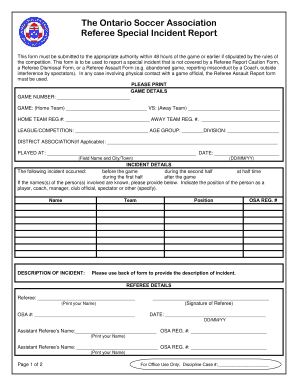
The Ontario Soccer Association Referee Special Incident Report This form must be submitted to the appropriate authority within 48 hours of the game or earlier if stipulated by the rules of the competition.

How it works

  1. Open form

    Open form follow the instructions

  2. Easily sign form

    Easily sign the form with your finger

  3. Share form

    Send filled & signed form or save

How to fill out the Canada OSA Referee Special Incident Report Form - Ontario online

The Canada OSA Referee Special Incident Report Form is an essential document for reporting special incidents that occur during games. This guide will provide clear, step-by-step instructions on how to fill out the form online, ensuring that you accurately report any incidents and comply with the regulations of the Ontario Soccer Association.

Follow the steps to fill out the report form correctly.

  1. Click ‘Get Form’ button to obtain the form and open it in the editor.
  2. Begin by filling out the game details section. Input the game number and the home and away teams' names. Include the registration numbers for both teams, the league or competition name, the age group and division, the district association (if applicable), the location where the game was played, and the date formatted as DD/MM/YY.
  3. In the incident details section, identify when the incident occurred by selecting one of the provided options: before the game, during the first half, at half time, during the second half, or after the game. If the names of any individuals involved are known, provide those along with their role in the incident, such as player, coach, manager, or spectator.
  4. Provide a concise description of the incident in the designated area. Ensure to capture all relevant details that occurred during the game. If more space is needed, utilize the back of the form for additional information.
  5. Complete the referee details section by printing your name, providing your OSA number, and signing the form. This section should also include the names and OSA registration numbers of any assistant referees involved.
  6. Once all sections of the form are filled out, review the information for accuracy. Ensure that all required fields are completed.
  7. After reviewing, save the changes to your completed form. You may then choose to download, print, or share the form as needed to submit to the relevant authorities.

Take action and complete your document online now.

Get form

Experience a faster way to fill out and sign forms on the web. Access the most extensive library of templates available.
Get form

Related content

Special Incident Reporting (SIR) Requirements
Special Incident Reporting Requirements. Title 17, Section 54327. When reporting a special...
Learn more
LIC 624 - Unusual Incident/Injury Report
s Rape s Injury-Accident s Medical Emergency s Aggressive Act/Self s Sexual s Pregnancy s...
Learn more
Incident Reports - Staff.Wiki
Because of the potential sensitivity of incident reports, Staff.Wiki has special features...
Learn more

Related links form

Please Complete And Send In - Amherst AMHERST COLLEGE RETIREMENT PLAN ELECTION FORM Claim For Reimbursement AMHERST COLLEGE EXPENSE VOUCHER

Questions & Answers

Get answers to your most pressing questions about US Legal Forms API.

Contact support

If you would like to become a referee you must take either an entry level course (minimum age 14) or a small sided soccer course ( minimum age 12). In order to participate in a small sided soccer referee course, an individual must be at least 12 years old on or before March 31st the year of the course.

The Small Sided Game Course is for those who would like to become an accredited referee on 7v7 games and are 12 years of age (by March 31st) and older. By taking the course a referee is automatically registered for the season with Ontario Soccer and does not have to register again until the following year.

Ontario Soccer offers three courses for those looking to become registered Match Officials: Small Sided Clinics, Entry Level Clinics, and Futsal Clinics. To find and register for courses, please follow the 'Register for a Course' link provided below!

As of Oct 10, 2023, the average hourly pay for a Soccer Referee in California is $20.81 an hour. While ZipRecruiter is seeing salaries as high as $34.91 and as low as $8.73, the majority of Soccer Referee salaries currently range between $14.95 (25th percentile) to $23.17 (75th percentile) in California.

As of Oct 10, 2023, the average hourly pay for a Soccer Referee in Ontario is $17.53 an hour. While ZipRecruiter is seeing salaries as high as $27.88 and as low as $9.38, the majority of Soccer Referee salaries currently range between $12.26 (25th percentile) to $18.99 (75th percentile) in Ontario.

Get This Form Now!

Use professional pre-built templates to fill in and sign documents online faster. Get access to thousands of forms.
Get form
If you believe that this page should be taken down, please follow our DMCA take down processhere.
Get Canada OSA Referee Special Incident Report Form - Ontario
Get form
  • Adoption
  • Bankruptcy
  • Contractors
  • Divorce
  • Home Sales
  • Employment
  • Identity Theft
  • Incorporation
  • Landlord Tenant
  • Living Trust
  • Name Change
  • Personal Planning
  • Small Business
  • Wills & Estates
  • Packages A-Z
  • Affidavits
  • Bankruptcy
  • Bill of Sale
  • Corporate - LLC
  • Divorce
  • Employment
  • Identity Theft
  • Internet Technology
  • Landlord Tenant
  • Living Wills
  • Name Change
  • Power of Attorney
  • Real Estate
  • Small Estates
  • Wills
  • All Forms
  • Forms A-Z
  • Other Templates
  • Legal Hub
  • About Us
  • Help Portal
  • Legal Resources
  • Blog
  • Affiliates
  • Contact Us
  • Delete My Account
  • Site Map
  • Industries
  • Forms in Spanish
  • Localized Forms
  • State-specific Forms
  • Forms Kit
  • Real Estate Handbook
  • All Guides
  • Notarize
  • Incorporation services
  • For Consumers
  • For Small Business
  • For Attorneys
  • USLegal
  • FormsPass
  • pdfFiller
  • signNow
  • altaFlow
  • DocHub
  • Instapage
Form Packages
  • Adoption
  • Bankruptcy
  • Contractors
  • Divorce
  • Home Sales
  • Employment
  • Identity Theft
  • Incorporation
  • Landlord Tenant
  • Living Trust
  • Name Change
  • Personal Planning
  • Small Business
  • Wills & Estates
  • Packages A-Z
Form Categories
  • Affidavits
  • Bankruptcy
  • Bill of Sale
  • Corporate - LLC
  • Divorce
  • Employment
  • Identity Theft
  • Internet Technology
  • Landlord Tenant
  • Living Wills
  • Name Change
  • Power of Attorney
  • Real Estate
  • Small Estates
  • Wills
  • All Forms
  • Forms A-Z
  • Other Templates
Customer Service
  • Legal Hub
  • About Us
  • Help Portal
  • Legal Resources
  • Blog
  • Affiliates
  • Contact Us
  • Delete My Account
  • Site Map
  • Industries
  • Forms in Spanish
  • Localized Forms
  • State-specific Forms
  • Forms Kit
Legal Guides
  • Real Estate Handbook
  • All Guides
Prepared for you
  • Notarize
  • Incorporation services
Our Customers
  • For Consumers
  • For Small Business
  • For Attorneys
Our Sites
  • USLegal
  • FormsPass
  • pdfFiller
  • signNow
  • altaFlow
  • DocHub
  • Instapage
Social Media
Call us now toll free:
+1 833 426 79 33
As seen in:
© Copyright 1999-2026 airSlate Legal Forms, Inc. 17 Station Street, Ste. 203, Brookline, MA 02445
  • Your Privacy Choices
  • Terms of Service
  • Privacy Notice
  • Content Takedown Policy
  • Bug Bounty Program