Loading
Form preview
  • US Legal Forms
  • Other Templates
  • More Forms
  • More Multi-State Forms
  • Oh Jfs 07048 2021

Get Oh Jfs 07048 2021-2026

234567897559 9 47 47 ! " 2345#747$577 45 %& '&()* 5%& '&()*&+ 7,4 7923457 857 .5 3849 8 49 7. 5 785959 5 9 7/34 77 8577 5 37 9 752345/4 34 '+95 3759 5 34 79 7(0 59 45 95 7/34 7 7854 1 9 5 4 7 7854.

How it works

  1. Open form

    Open form follow the instructions

  2. Easily sign form

    Easily sign the form with your finger

  3. Share form

    Send filled & signed form or save

How to fill out the OH JFS 07048 online

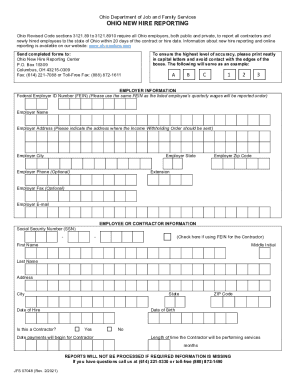
Filling out the OH JFS 07048 form is a crucial step for employers in Ohio who need to report new hires and contractors. This guide provides clear, step-by-step instructions to help you complete the form accurately and efficiently.

Follow the steps to successfully complete the OH JFS 07048 form.

  1. Click ‘Get Form’ button to obtain the form and open it in your preferred editor.
  2. Begin by filling in the employer information section. Input the Federal Employer ID Number (FEIN) and ensure it matches the reported employee's quarterly wages. Provide the employer's name, address, city, state, and zip code, as well as the optional employer phone number and email address.
  3. Proceed to the employee or contractor information section. Enter the social security number (SSN) of the individual. If using the FEIN instead of SSN, check the corresponding box.
  4. Enter the first name, middle initial (if applicable), and last name of the employee or contractor. Provide the residential address, city, state, and zip code.
  5. Indicate the date of hire and whether the individual is a contractor by checking 'Yes' or 'No' as appropriate. If applicable, fill in the date payments will begin for the contractor and the estimated length of time services will be performed in months.
  6. Review the form for completeness and accuracy. Ensure all required fields are filled, as reports will not be processed if required information is missing.
  7. Once all sections are completed, save your changes. You may then download, print, or share the form as needed. Ensure to send the completed form to the Ohio New Hire Reporting Center at the provided address or fax.

Complete your OH JFS 07048 form online today to ensure timely reporting of new hires!

Get form

Experience a faster way to fill out and sign forms on the web. Access the most extensive library of templates available.
Get form

Related content

Nevada Secretary of State | Home
Official site of the Nevada Secretary of State. Information on elections, businesses...
Learn more
Notre Dame College: Homepage
Notre Dame College is a liberal arts college located in Cleveland, OH. An NCAA Division II...
Learn more
Apple Developer
There's never been a better time to develop for Apple platforms.
Learn more

Related links form

Homecoming Block Party 2010 Staff/Volunteer Information Form Alumni Information Form - Calbaptist Student Employment Application Denied Unsubsidized Loan Request Form - Cca

Get This Form Now!

Use professional pre-built templates to fill in and sign documents online faster. Get access to thousands of forms.
Get form
If you believe that this page should be taken down, please follow our DMCA take down processhere.
Get OH JFS 07048
Get form

Form categories

Real Estate
  • Home Sale
  • Deeds
  • Leases
  • Landlord Tenant
  • First Refusal Agreement
  • Lis Pendens
  • View all Real Estate
Business & Commercial
  • Small Business
  • Contracts
  • Construction
  • Employment
  • Limited Liability Company
  • Partnerships
  • View all Business & Commercial
Estate Planning
  • Personal Planning
  • Last Will and Testament
  • Living Trust
  • Power of Attorney
  • Living Will (Healthcare Directive)
  • Probate
  • Trusts
  • Small Estate
  • View all Estate Planning

Other Legal Areas

  • Civil Actions
  • Civil Procedure
  • Animals
  • Affidavits
  • Bill of Sale
  • Oil Gas and Minerals
  • Name Change
  • Other
Family Law
  • Divorce
  • Annulment
  • Adoption
  • Marriage
  • Child Justice
  • View all Family Law
  • Forms Catalog
  • Other Templates

Company

  • About Us
  • Pricing
  • Legal Hub
  • Affiliate Program

Knowledge Base

  • Help Portal
  • Legal Resources
  • Blog
  • Industries
  • Legal Guides
  • Sitemap

Services

  • Notarize
  • Form Selector

Support

  • Contact Us
  • Delete My Account

Products

  • USLegal
  • FormsPass
  • pdfFiller
  • signNow
  • altaFlow
  • DocHub
  • Instapage
Social Media
Call us now toll free:
+1 833 426 79 33
As seen in:
© 2026 US Legal Forms. All rights reserved.
  • Your Privacy Choices
  • Terms of Service
  • Privacy Notice
  • Content Takedown Policy
  • Bug Bounty Program