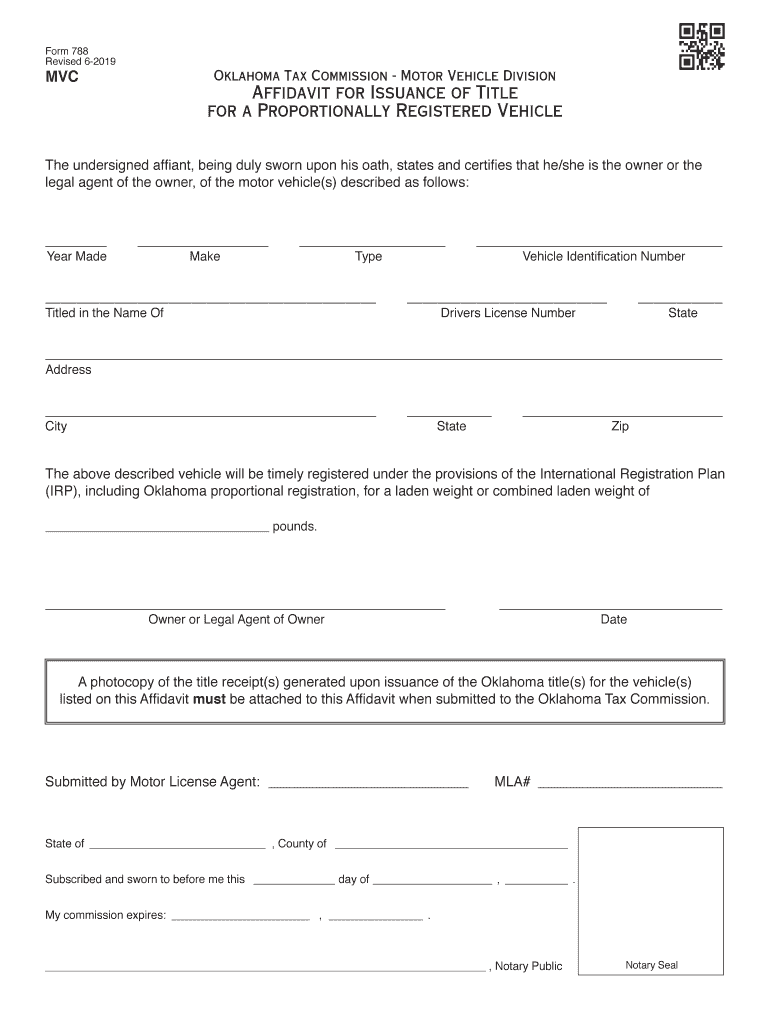
Form 788 Revised 62019MVCOklahoma Tax Commission Motor Vehicle DivisionAffidavit for Issuance of Title for a Proportionally Registered VehicleThe undersigned affiant, being duly sworn upon his oath,.

Open form follow the instructions

Easily sign the form with your finger

Send filled & signed form or save
How to fill out the OK Form 788 online
Filling out the OK Form 788 online can simplify the process of obtaining a title for your proportionally registered vehicle. This guide provides step-by-step instructions to ensure that you complete the form accurately and efficiently.
Follow the steps to fill out the OK Form 788 online.
- Press the ‘Get Form’ button to access the OK Form 788 and open it in the online editor.
- Begin filling out the form by providing the year made of the vehicle in the specified field.
- Enter the make of the vehicle in the designated section accurately.
- Specify the type of vehicle in the relevant field to ensure proper classification.
- In the 'Titled in the Name Of' section, write the name of the owner or legal agent responsible for the vehicle.
- Fill in the Vehicle Identification Number (VIN) as it appears on the vehicle.
- Input the driver's license number of the person completing the form along with the issuing state.
- Complete the address section by writing the full street address, city, state, and zip code.
- Indicate the laden weight or combined laden weight of the vehicle in pounds.
- At the bottom of the form, confirm your identity by entering the name of the owner or legal agent of the owner.
- Date the form before submission by writing today's date.
- Ensure to attach a photocopy of the title receipt(s) upon submission, as required.
- Once all fields are completed, save the changes, and then choose to download, print, or share the completed form.
Complete your forms online to streamline the process and ensure efficiency.
Experience a faster way to fill out and sign forms on the web. Access the most extensive library of templates available.
Related content
Oklahoma Tax Commission - Motor Vehicle Division. Affidavit for Issuance of Title ... Form...
Please return this form to: SWOSU, Registrar's Office, 100 Campus Drive, Weatherford, OK...
The U.S. commonwealth of Kentucky has 120 counties. Despite ranking 37th in size by area...
Get answers to your most pressing questions about US Legal Forms API.
What is the fine for a tag in Oklahoma?
Penalty is assessed on the tag at the rate of $1.00 per day up to a maximum of $100.00 for 100 days of penalty.
How do I change the title on my car in Oklahoma?
What You'll Need to Transfer your Vehicle Title in Oklahoma Oklahoma Certificate of Title, properly assigned and notarized. Current registration information (unless you're transferring a junk title). Proof of liability insurance. A completed odometer disclosure statement for vehicles 9 years old or newer.
What is the black tag law in Oklahoma?
A vehicle needs a Black Tag when the vehicle is temporarily not being driven on the road and is not insured. The purpose of obtaining a Black Tag is to avoid incurring penalties while this vehicle is not in use and not insured. Owner will not receive decals but there will be no penalties accrued.
How do I get my driving record in Oklahoma?
In order to obtain your Oklahoma MVR (Motor Vehicle Report), you must complete and submit a Records Request form along with the appropriate fee to the Department of Public Safety or you may purchase your Oklahoma MVR from any tag agency in this state. You can locate the Records Request form by clicking here.
What is the new tag law in Oklahoma?
“Starting July, if you sell a vehicle, remove the tag,” said OTC spokesperson Paula Ross. “The tag will now stay with the person, not the car. When motorists purchase a new car, they will take the tag from their old car and place it on the new one.
Do you keep your tag when you sell your car in Oklahoma?
Did you know? In Oklahoma, your License Plate is assigned to you, the person, not your vehicle. If you sell your vehicle, it is important that you keep your License Plate.
How do I notify DMV that I sold my car in Oklahoma?
A Notice of Transfer is a form which can be completed online or at a tag agency and submitted in order to put the Oklahoma Tax Commission Motor Vehicle Division on notice that you have sold your vehicle and to whom you have sold it to. The cost is $10.00. Download the Notice of Transfer form here.
What to do after selling a car in Oklahoma?
After the sale, the seller must submit their current vehicle registration which will be canceled, and the buyer will submit their own application for registration in their name(s). Sellers may use the notice of transfer by completing Form 773.
How do Oklahoma tags work?
Tags have a 30 day grace period where no penalty is charged. For newly purchased vehicles, penalties will accrue on the thirty-first (31st) day following ownership assignment. Most registration classes will begin at a rate of $1/day to a max of $100/year.
Can you register a car without a license in Oklahoma?
In order to register a vehicle with the Department of Motor Vehicles (DMV), you need proof of insurance and a valid driver's license. Since you don't have a driver's license, you'll need to register the vehicle in another person's name and make them the title holder.
Use professional pre-built templates to fill in and sign documents online faster. Get access to thousands of forms.
If you believe that this page should be taken down, please follow our DMCA take down process here.