Loading
Get Hkrs Parent 1-mile Run: Event Waiver
How it works
-

Open form follow the instructions
-

Easily sign the form with your finger
-

Send filled & signed form or save
How to fill out the HKRS PARENT 1-MILE RUN: EVENT WAIVER online
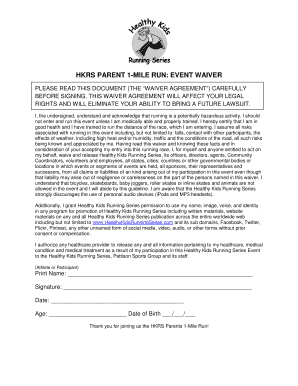
Completing the HKRS Parent 1-Mile Run: Event Waiver is a crucial step for participants and their parents or guardians. This guide will provide clear, step-by-step instructions to help you fill out the waiver accurately and efficiently.
Follow the steps to fill out the waiver form correctly.
- Press the ‘Get Form’ button to access the waiver form and open it in a suitable editor.
- Begin by reading the waiver agreement carefully. It outlines important information regarding the risks associated with the running event and your rights.
- In the first blank field, print your name clearly as the athlete or participant. This identifies you as the person entering the event.
- Next, provide your signature in the designated area. This signature confirms your understanding and agreement to the terms of the waiver.
- Fill in the date of signing the waiver where indicated.
- Input your age in the next field, keeping in mind that this information may be essential for event categorization.
- Finally, enter your date of birth in the provided format (MM/DD/YYYY) to verify your age for participation.
- Once all sections are completed, review your entries for accuracy to ensure all required information is present.
- After reviewing, you can save your changes, download a copy for your records, print the document, or share it as needed.
Complete the HKRS Parent 1-Mile Run: Event Waiver online today to secure your spot in the race!