Loading
Form preview
  • US Legal Forms
  • Other Templates
  • Executive Forms
  • Executive Department DOJ Forms
  • Atf 6a (5330.3c) 2021

Get Atf 6a (5330.3c) 2021-2026

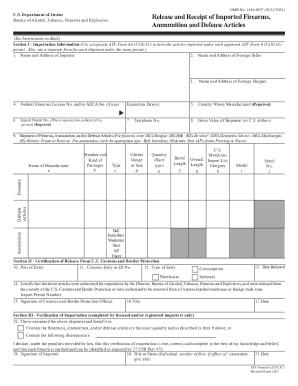
OMB No. 11400007 (03/31/2024)U.S. Department of Justice Bureau of Alcohol, Tobacco, Firearms and ExplosivesRelease and Receipt of Imported Firearms, Ammunition and Defense Articles(See Instructions.

How it works

  1. Open form

    Open form follow the instructions

  2. Easily sign form

    Easily sign the form with your finger

  3. Share form

    Send filled & signed form or save

How to use or fill out the ATF 6A (5330.3C) online

Filling out the ATF Form 6A (5330.3C) online is a crucial step for anyone engaged in the importation of firearms, ammunition, and defense articles. This guide will provide clear, step-by-step instructions for efficiently completing the form and ensuring compliance with federal regulations.

Follow the steps to successfully complete the ATF Form 6A online.

  1. Click ‘Get Form’ button to obtain the form and open it in the editor.
  2. In Section I, Importation Information, fill in the name and address of the importer. Ensure that all contact details are accurate for communication purposes.
  3. Provide the name and address of the foreign seller. This information is essential for verifying the source of the imported items.
  4. Complete the field for the federal firearms license number and/or AECA number, if applicable. This indicates your authority to import firearms or defense articles.
  5. Enter the name and address of the foreign shipper, including any relevant expiration dates related to the shipment.
  6. Specify the country where the item was manufactured, which is a required field for the import process.
  7. Provide your telephone number for further inquiries or follow-ups.
  8. Indicate the gross value of the shipment in U.S. dollars, which is necessary for customs purposes.
  9. Complete the section detailing the shipment of firearms, ammunition, and/or defense articles by entering the type, caliber, quantity, and other specifications for each item being imported.
  10. In Section II, provide the port of entry, customs entry or ID number, and the type of entry, along with the date released. This section certifies that the items were authorized for release by the Bureau of Alcohol, Tobacco, Firearms and Explosives.
  11. In Section III, only licensed and/or registered importers need to fill this section out. Verify the shipment and report any discrepancies found during examination. Additionally, provide your signature and title.
  12. Finally, review the completed form for accuracy. After confirming that all information is correct, save any changes, download the document, or print it as needed for your records.

Complete your ATF Form 6A online today to ensure compliance with import regulations.

Get form

Experience a faster way to fill out and sign forms on the web. Access the most extensive library of templates available.
Get form

Related content

Form 6A - Release and Receipt of Imported Firearms...
Form 6A - Release and Receipt of Imported Firearms, Ammunition and Implements of War (ATF...
Learn more
Release and Receipt of Imported Firearms...
Jul 31, 2014 - Section I - Importation Information (Use a separate ATF Form 6A (5330.3C)...
Learn more

Related links form

Certification Of Health Care Provider For Serious Health Condition ... - Hr Duke LANDLORD VERIFICATION FORM Ratio Code Breaker RIJTL - Teachit Maths Cp2000 Pdf

Get This Form Now!

Use professional pre-built templates to fill in and sign documents online faster. Get access to thousands of forms.
Get form
If you believe that this page should be taken down, please follow our DMCA take down processhere.
Get ATF 6A (5330.3C)
Get form
  • Adoption
  • Bankruptcy
  • Contractors
  • Divorce
  • Home Sales
  • Employment
  • Identity Theft
  • Incorporation
  • Landlord Tenant
  • Living Trust
  • Name Change
  • Personal Planning
  • Small Business
  • Wills & Estates
  • Packages A-Z
  • Affidavits
  • Bankruptcy
  • Bill of Sale
  • Corporate - LLC
  • Divorce
  • Employment
  • Identity Theft
  • Internet Technology
  • Landlord Tenant
  • Living Wills
  • Name Change
  • Power of Attorney
  • Real Estate
  • Small Estates
  • Wills
  • All Forms
  • Forms A-Z
  • Other Templates
  • Legal Hub
  • About Us
  • Help Portal
  • Legal Resources
  • Blog
  • Affiliates
  • Contact Us
  • Delete My Account
  • Site Map
  • Industries
  • Forms in Spanish
  • Localized Forms
  • State-specific Forms
  • Forms Kit
  • Real Estate Handbook
  • All Guides
  • Notarize
  • Incorporation services
  • For Consumers
  • For Small Business
  • For Attorneys
  • USLegal
  • FormsPass
  • pdfFiller
  • signNow
  • altaFlow
  • DocHub
  • Instapage
Form Packages
  • Adoption
  • Bankruptcy
  • Contractors
  • Divorce
  • Home Sales
  • Employment
  • Identity Theft
  • Incorporation
  • Landlord Tenant
  • Living Trust
  • Name Change
  • Personal Planning
  • Small Business
  • Wills & Estates
  • Packages A-Z
Form Categories
  • Affidavits
  • Bankruptcy
  • Bill of Sale
  • Corporate - LLC
  • Divorce
  • Employment
  • Identity Theft
  • Internet Technology
  • Landlord Tenant
  • Living Wills
  • Name Change
  • Power of Attorney
  • Real Estate
  • Small Estates
  • Wills
  • All Forms
  • Forms A-Z
  • Other Templates
Customer Service
  • Legal Hub
  • About Us
  • Help Portal
  • Legal Resources
  • Blog
  • Affiliates
  • Contact Us
  • Delete My Account
  • Site Map
  • Industries
  • Forms in Spanish
  • Localized Forms
  • State-specific Forms
  • Forms Kit
Legal Guides
  • Real Estate Handbook
  • All Guides
Prepared for you
  • Notarize
  • Incorporation services
Our Customers
  • For Consumers
  • For Small Business
  • For Attorneys
Our Sites
  • USLegal
  • FormsPass
  • pdfFiller
  • signNow
  • altaFlow
  • DocHub
  • Instapage
Social Media
Call us now toll free:
+1 833 426 79 33
As seen in:
© Copyright 1999-2026 airSlate Legal Forms, Inc. 17 Station Street, Suite 303, Brookline, MA 02445
  • Your Privacy Choices
  • Terms of Service
  • Privacy Notice
  • Content Takedown Policy
  • Bug Bounty Program