Loading
Form preview
  • US Legal Forms
  • Other Templates
  • Foreign Forms
  • Foreign UK Other Forms
  • Uk Tpt Retirement Solutions Opt Out Notice 2019

Get Uk Tpt Retirement Solutions Opt Out Notice 2019-2026

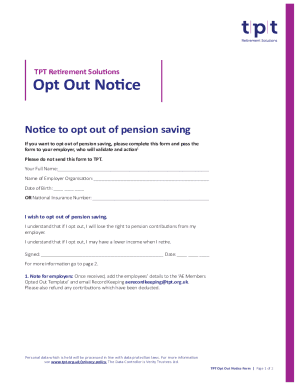
TPT Retirement SolutionsOpt Out Notice Notice to opt out of pension saving If you want to opt out of pension saving, please complete this form and pass the form to your employer, who will validate.

How it works

  1. Open form

    Open form follow the instructions

  2. Easily sign form

    Easily sign the form with your finger

  3. Share form

    Send filled & signed form or save

How to fill out the UK TPT Retirement Solutions Opt Out Notice online

This guide provides step-by-step instructions for completing the UK TPT Retirement Solutions Opt Out Notice online. Follow these clear and supportive steps to ensure your form is filled out correctly and submitted to your employer.

Follow the steps to complete the form successfully.

  1. Click ‘Get Form’ button to obtain the form and open it in the online editor.
  2. Fill in your full name in the designated field. This should be your official name as it appears on legal documents.
  3. Enter the name of your employer organization in the specific field to identify the employer you are opting out with.
  4. Provide your date of birth or your National Insurance number in the next section, ensuring that the information matches your official records.
  5. Check the box indicating your wish to opt out of pension saving. It is crucial to confirm your understanding of the implications outlined in the notice.
  6. Sign the form in the designated area to validate your request to opt out. Ensure your signature is clear.
  7. Date your signature in the final field to provide a record of when the opt-out notice was completed.
  8. Once completed, save your changes, and choose to download or print the form for your records. Afterward, submit it to your employer for processing.

Complete your forms online today to manage your retirement options effectively.

Get form

Experience a faster way to fill out and sign forms on the web. Access the most extensive library of templates available.
Get form

Related content

Form S-1 - SEC.gov
If any securities being registered on this Form are to be offered on a delayed or ... to...
Learn more

Related links form

ALL ABOUT ART CLUB MEMBERSHIP AND RENEWAL FORM - Scartclub Non Solicitation Agreement Sample Fairfield County Job And Family Services Travel Division:

Questions & Answers

Get answers to your most pressing questions about US Legal Forms API.

Contact support

If you're looking to opt back into the Scheme you simply need to complete our opt in form.

Yes, if you'd like to stop paying contributions you can Opt Out of the Teachers' Pension Scheme. How do I Opt out? The simplest way to Opt out is to complete the online form. Once you've completed this form, it's automatically sent to your employer who will provide further details before sending it to us.

Until now, staying in the workplace pension scheme you have been put in by your employer, has been a fairly easy choice the contribution rates have been low and opting out would mean losing free money from your employer, and potentially the Government. But, if you can afford it, pension saving can be a good idea.

You can leave (called 'opting out') if you want to. If you opt out within a month of your employer adding you to the scheme, you'll get back any money you've already paid in. You may not be able to get your payments refunded if you opt out later - they'll usually stay in your pension until you retire.

You can either call our opt-out service on 0300 330 1280; or you can opt out online (you won't need to set up your Online Account to do this).

You can opt out of your employer's workplace pension scheme after you've been enrolled. ... After the first month, you can still opt out at any time, but any payments you've made will stay in your pension pot for retirement rather than be refunded.

Yes, if you'd like to stop paying contributions you can Opt Out of the Teachers' Pension Scheme. How do I Opt out? The simplest way to Opt out is to complete the online form. Once you've completed this form, it's automatically sent to your employer who will provide further details before sending it to us.

You can leave (called 'opting out') if you want to. If you opt out within a month of your employer adding you to the scheme, you'll get back any money you've already paid in. You may not be able to get your payments refunded if you opt out later - they'll usually stay in your pension until you retire.

If you have opted out of your employer's workplace pension scheme, or stopped paying contributions, you can rejoin the scheme at a later date. How can I rejoin my employer's scheme? ... You can also decide to opt in at any time by speaking to your employer.

How do you opt out? To opt out, you need to ask the pension provider for an opt-out form. Your employer must give you the contact details for the pension provider if you ask for them. You should complete and sign the form and return it to your employer (or the address given on the form).

Get This Form Now!

Use professional pre-built templates to fill in and sign documents online faster. Get access to thousands of forms.
Get form
If you believe that this page should be taken down, please follow our DMCA take down processhere.
Get UK TPT Retirement Solutions Opt Out Notice
Get form
  • Adoption
  • Bankruptcy
  • Contractors
  • Divorce
  • Home Sales
  • Employment
  • Identity Theft
  • Incorporation
  • Landlord Tenant
  • Living Trust
  • Name Change
  • Personal Planning
  • Small Business
  • Wills & Estates
  • Packages A-Z
  • Affidavits
  • Bankruptcy
  • Bill of Sale
  • Corporate - LLC
  • Divorce
  • Employment
  • Identity Theft
  • Internet Technology
  • Landlord Tenant
  • Living Wills
  • Name Change
  • Power of Attorney
  • Real Estate
  • Small Estates
  • Wills
  • All Forms
  • Forms A-Z
  • Other Templates
  • Legal Hub
  • About Us
  • Help Portal
  • Legal Resources
  • Blog
  • Affiliates
  • Contact Us
  • Delete My Account
  • Site Map
  • Industries
  • Forms in Spanish
  • Localized Forms
  • State-specific Forms
  • Forms Kit
  • Real Estate Handbook
  • All Guides
  • Notarize
  • Incorporation services
  • For Consumers
  • For Small Business
  • For Attorneys
  • USLegal
  • FormsPass
  • pdfFiller
  • signNow
  • altaFlow
  • DocHub
  • Instapage
Form Packages
  • Adoption
  • Bankruptcy
  • Contractors
  • Divorce
  • Home Sales
  • Employment
  • Identity Theft
  • Incorporation
  • Landlord Tenant
  • Living Trust
  • Name Change
  • Personal Planning
  • Small Business
  • Wills & Estates
  • Packages A-Z
Form Categories
  • Affidavits
  • Bankruptcy
  • Bill of Sale
  • Corporate - LLC
  • Divorce
  • Employment
  • Identity Theft
  • Internet Technology
  • Landlord Tenant
  • Living Wills
  • Name Change
  • Power of Attorney
  • Real Estate
  • Small Estates
  • Wills
  • All Forms
  • Forms A-Z
  • Other Templates
Customer Service
  • Legal Hub
  • About Us
  • Help Portal
  • Legal Resources
  • Blog
  • Affiliates
  • Contact Us
  • Delete My Account
  • Site Map
  • Industries
  • Forms in Spanish
  • Localized Forms
  • State-specific Forms
  • Forms Kit
Legal Guides
  • Real Estate Handbook
  • All Guides
Prepared for you
  • Notarize
  • Incorporation services
Our Customers
  • For Consumers
  • For Small Business
  • For Attorneys
Our Sites
  • USLegal
  • FormsPass
  • pdfFiller
  • signNow
  • altaFlow
  • DocHub
  • Instapage
Social Media
Call us now toll free:
+1 833 426 79 33
As seen in:
© Copyright 1999-2026 airSlate Legal Forms, Inc. 17 Station Street, Ste. 203, Brookline, MA 02445
  • Your Privacy Choices
  • Terms of Service
  • Privacy Notice
  • Content Takedown Policy
  • Bug Bounty Program