Loading
Get Holland-brown-irvine Reunion Registration Form 2017-2026
How it works
-

Open form follow the instructions
-

Easily sign the form with your finger
-

Send filled & signed form or save
How to fill out the Holland-Brown-Irvine Reunion Registration Form online
Completing the Holland-Brown-Irvine Reunion Registration Form online is a straightforward process that ensures your participation in this exciting event. This guide will provide you with clear instructions on how to navigate the form and submit your registration efficiently.
Follow the steps to complete your online registration form.
- Click ‘Get Form’ button to obtain the form and open it in the editor.
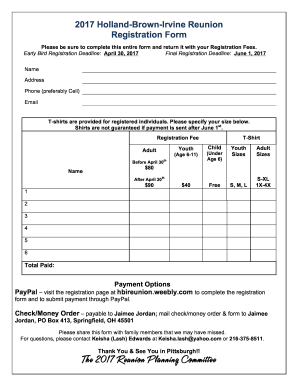
- Begin by entering your name in the designated field. Ensure that all details are correct to avoid any issues with your registration.
- Provide your current address including street, city, state, and zip code. This information helps in communicating important details regarding the reunion.
- Fill in your phone number, preferably a cell phone number, for immediate communication if necessary.
- Enter your email address to receive confirmation and updates about the reunion.
- Select your T-shirt size from the provided options. Make sure to choose accurately as shirts are not guaranteed for payments arrived after June 1st.
- Indicate the appropriate registration fee based on your category (Adult, Youth, or Child) and the timing of your registration.
- Add up any additional items as needed and enter the total paid in the designated section.
- Choose your payment method, providing any necessary details for PayPal or checks/money orders.
- Review the completed form, ensuring all fields are filled out accurately before finalizing your submission.
- Save your changes, download a copy for your records, and either print or share the form as necessary.
Complete your registration form online today to ensure your participation in the reunion!