Loading
Get Ny Osc Rs 6355 2014-2026
How it works
-

Open form follow the instructions
-

Easily sign the form with your finger
-

Send filled & signed form or save
How to fill out the NY OSC RS 6355 online
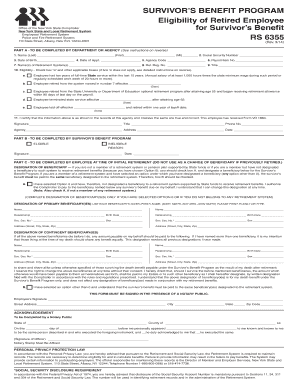
This guide provides a clear and supportive overview of the process for completing the NY OSC RS 6355 form online. Whether you are assisting someone in filling it out or doing it yourself, this comprehensive guide will help you navigate each section with ease.
Follow the steps to fill out the NY OSC RS 6355 form online.
- Click 'Get Form' button to obtain the form and open it in the editor.
- In Part A, provide the name of the employee in the designated fields. Ensure to include the last name, first name, and middle initial.
- Enter the employee's Social Security number in the specified field, which is crucial for identification.
- Complete the date of birth field with the employee's birthdate.
- Fill in the date of appointment to the employee's first State position.
- Input the agency code that corresponds to the employee's department.
- Provide the payroll item number in the respective field.
- List the retirement system(s) the employee is associated with under the corresponding section.
- Enter the retirement registration number for the retirement system mentioned.
- Specify the employee's title in the job position.
- Check the eligibility box indicating that the employee has ten years of full-time State service within the last 15 years, or other applicable conditions. Ensure any checked boxes are completed as instructed in the detailed guidelines.
- Have the authorized personnel sign and provide their title, phone number, agency, address, and the date in the area designated for completeness.
- In Part B, the Survivor's Benefit Program will indicate eligibility status by checking the appropriate box and signing with the date.
- For Part C, if the employee wishes to designate a beneficiary, complete the beneficiary section accurately, including names, relationships, and necessary details.
- Ensure the document is signed in the presence of a notary public as required, completing the acknowledgment section.
- After all sections have been filled out and confirmed for accuracy, users can save changes, download, print, or share the completed form as needed.
Start completing the NY OSC RS 6355 online today to ensure accurate and timely submission.