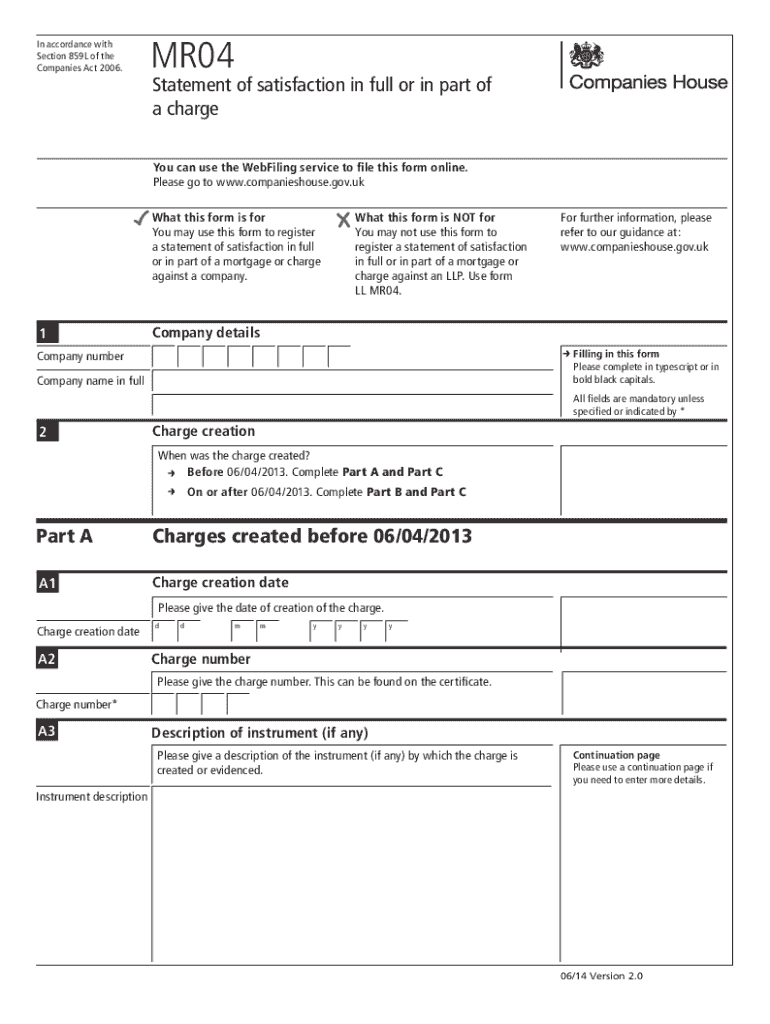
In accordance with Section 859L of the Companies Act 2006.MR04Statement of satisfaction in full or in part of a charge You can use the WebFiling service to file this form online. Please go to www.companieshouse.gov.uk What.
Loading

Open form follow the instructions

Easily sign the form with your finger

Send filled & signed form or save
How to fill out the UK MR04 online
The UK MR04 form is crucial for registering a statement of satisfaction regarding a charge against a company. This guide provides structured, step-by-step instructions to assist users in successfully completing the form online.
Follow the steps to complete the MR04 form with ease.
- Click ‘Get Form’ button to access the MR04 form and open it for completion.
- Begin by entering the mandatory company details including the company number and full company name in bold black capitals.
- Identify if the charge was created before or on/after 06/04/2013 to determine which parts of the form you need to complete.
- In Part A (for charges created before 06/04/2013):
- In Part B (for charges created on or after 06/04/2013):
- In Part C (to be completed regardless of charge date):
- Optionally provide contact information for follow-up, noting it will appear on the public record.
- After completing the form, review all entries for accuracy, then save changes, download, or print the form as needed.
Complete your MR04 form online today and ensure your charges are accurately recorded.
Experience a faster way to fill out and sign forms on the web. Access the most extensive library of templates available.
Related content
Feb 12, 2019 — HeLa cells were transiently transfected with a non-viral precursor miRNA...
Mar 18, 2020 — strongest worst-case to average-case reductions [MR04, GPV08, Reg05] all...
15 www.daitem.co.uk DAITEM • ATRAL (UK) Ltd • Hortonwood 50 ... 23 Email:...
Get answers to your most pressing questions about US Legal Forms API.
Who registers a charge at Companies House?
Any person 'interested in the charge' can register a charge at Companies House. This could be the company itself, the lender or their agent. Use our online filing service to register your charge for a reduced fee of £15.
How do you remove a debenture?
1 1) The debenture may be removed, when the deed is being recorded to transfer ownership, by completing the recorded interest section of the Form 24. 2) The debenture may be removed after the deed has been recorded and ownership has transferred, by completing the field 'Removal by operation of law'.
Who can remove a charge at Companies House?
Once any security has been discharged or released, a lender ordinarily has no problem with the borrower applying to remove the charge from the register at Companies House; either by filing form MR04 (where the secured debt has been satisfied in full or in part), or form MR05 (where the charged property has been ...
What is satisfaction rate?
"Satisfaction Rate" is one of the metrics provided as part of Basic Statistics. It's calculated to give you an overall percentage of how satisfied your respondents are with your products and services. ... By using this information, the satisfaction rate can be calculated.
What is an mr04?
Use this form to register a statement of satisfaction in full or in part of a mortgage or charge against a company. Include the optional continuation pages if needed.
What happens if a charge is not registered at Companies House?
If the charge is not registered within 21 days, it may be difficult to recover the debt if the company becomes insolvent. The charge will be void against the liquidator or administrator and any creditor of the company. This means that the debt will remain payable, but it'll be unsecured.
What is an mr04 charge?
Form MR04 is for use where the debt for which the charge was granted has been paid or satisfied in full or in part. Form MR05 is for use where some or all of the property or undertaking which is the subject of the charge has been released from the charge and/or no longer form's part of the company's property.
What is customer satisfaction in simple words?
Customer satisfaction is defined as a measurement that determines how happy customers are with a company's products, services, and capabilities. Customer satisfaction information, including surveys and ratings, can help a company determine how to best improve or changes its products and services.
How do I remove a charge from title deeds?
Fill in form CN1 from Land Registry together with all your evidence that it has been paid in full. Land Registry then write to the creditor and give them 15 days in which to respond saying yes or no. If there is no response after 15 days, Land Registry will automatically remove it.
What is Statement satisfaction?
MR04 Statement of satisfaction in full or part of a charge. MR05 Statement that part or the whole of the property has been released from the charge or no longer forms a part of the company's property.
Use professional pre-built templates to fill in and sign documents online faster. Get access to thousands of forms.
If you believe that this page should be taken down, please follow our DMCA take down process here.