Loading
Form preview
  • US Legal Forms
  • Other Templates
  • More Forms
  • More Multi-State Forms
  • Employee Notification Of Intention To Use Earned Sick Leave

Get Employee Notification Of Intention To Use Earned Sick Leave

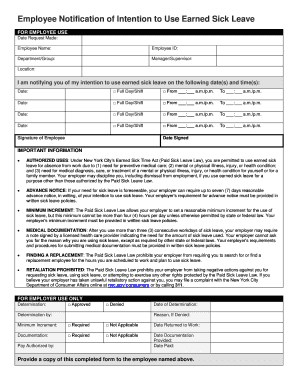
Employee Notification of Intention to Use Earned Sick Leave FOR EMPLOYEE USE Date Request Made: Employee Name:Employee ID:Department/Group:Manager/Supervisor:Location:I am notifying you of my intention.

How it works

  1. Open form

    Open form follow the instructions

  2. Easily sign form

    Easily sign the form with your finger

  3. Share form

    Send filled & signed form or save

How to fill out the Employee Notification Of Intention To Use Earned Sick Leave online

This guide provides clear, step-by-step instructions for completing the Employee Notification Of Intention To Use Earned Sick Leave form online. Users will find helpful tips to ensure their submission is accurate and compliant with applicable laws.

Follow the steps to successfully complete the form.

  1. Press the ‘Get Form’ button to access the form and open it in the online editor.
  2. Enter the date the request is made in the designated field. This indicates when you are formally notifying your employer of your intention to use earned sick leave.
  3. Fill in your full name as the employee in the appropriate field, ensuring that it matches your records.
  4. Input your employee ID number, which helps your employer identify you in their system.
  5. Specify your department or group. This information is essential for directing your request to the correct supervisor.
  6. Enter the name of your manager or supervisor. This ensures that the request reaches the right person.
  7. Indicate your work location as it may be necessary for processing the request.
  8. In the section for sick leave dates, list the date(s) you intend to use sick leave, marking whether it is a full day or specifying the start and end times.
  9. Repeat step 8 for any additional dates you plan to use sick leave. Ensure all information is entered completely for effectiveness.
  10. Sign the form to validate your request and input the date of signing. This confirms that the information provided is correct and made with intent.
  11. Once you have completed the form, you can save your changes, download a copy for your records, print it, or share it with the relevant parties as needed.

Complete your Employee Notification Of Intention To Use Earned Sick Leave form online today for a seamless process.

Get form

Experience a faster way to fill out and sign forms on the web. Access the most extensive library of templates available.
Get form

Related content

Employee Notification of Intention to Use Earned...
to use earned safe and sick leave for absence from work due to (1) need for preventive...
Learn more
New Jersey Earned Sick Leave - NJ.gov
Under New Jersey's Earned Sick Leave Law, most employees have a right to ... earned sick...
Learn more
Employee Policy Manual - SILO of research...
Work-Incurred Illness or Injury — Workers' Compensation ...................... 65. Site...
Learn more

Related links form

Csp Rlb Form Extended School Year Form - Keystone Learning Services - Kidss Keystonelearning New Students Joining Information - Pwani University Penske Online Payment System

Questions & Answers

Get answers to your most pressing questions about US Legal Forms API.

Contact support

Hi [Your Boss's Name], Due to a personal illness, I'm not going to be able to work tomorrow. I will be taking one of my paid sick days to rest and recover. I plan on checking my email periodically throughout the day but will let you know if my condition worsens and I need to go fully offline.

How to write a sick leave letter? The recipient name or function. Your name and function. The number of sick days you request and their dates. The reason for your request. A medical recommendation or certificate if your company requires one.

For short sick leave Hello! I'm currently out of the office due to a fever. ... Thank you for your message. I'm recovering from a flu and expect to be back in the office on Thursday. ... Hi, everyone! ... Thank you for your email. ... I'm not feeling well, so I'll be out of the office today.

What to Include in Your Sick Day Email Reason for your absence. Number of days that you will be out of the office. Whether or not you will answer urgent emails and calls. Doctor's note, if applicable. Name of the contact person who will handle your workload.

“Hi [Manager Name], so sorry for the last-minute text message, but I've had an unexpected illness come up, and I will have to take a sick day tomorrow. I've contacted [Name], who will be able to cover my shift in my absence. I hope to be better and able to work the following day, and will confirm with you tomorrow.

Try saying: I started feeling unwell yesterday evening, and I feel even worse this morning. I'm not feeling well enough to come to the office, and I don't want to risk passing anything on to anyone else. I'm going to take a sick day today to recover.

The subject is a gray area for many employees, but the laws in California clear up some of the questions. Your employer is allowed to ask you why you are taking a sick day, including asking the nature of your ailment.

Get This Form Now!

Use professional pre-built templates to fill in and sign documents online faster. Get access to thousands of forms.
Get form
If you believe that this page should be taken down, please follow our DMCA take down processhere.
Get Employee Notification Of Intention To Use Earned Sick Leave
Get form
  • Adoption
  • Bankruptcy
  • Contractors
  • Divorce
  • Home Sales
  • Employment
  • Identity Theft
  • Incorporation
  • Landlord Tenant
  • Living Trust
  • Name Change
  • Personal Planning
  • Small Business
  • Wills & Estates
  • Packages A-Z
  • Affidavits
  • Bankruptcy
  • Bill of Sale
  • Corporate - LLC
  • Divorce
  • Employment
  • Identity Theft
  • Internet Technology
  • Landlord Tenant
  • Living Wills
  • Name Change
  • Power of Attorney
  • Real Estate
  • Small Estates
  • Wills
  • All Forms
  • Forms A-Z
  • Other Templates
  • Legal Hub
  • About Us
  • Help Portal
  • Legal Resources
  • Blog
  • Affiliates
  • Contact Us
  • Delete My Account
  • Site Map
  • Industries
  • Forms in Spanish
  • Localized Forms
  • State-specific Forms
  • Forms Kit
  • Real Estate Handbook
  • All Guides
  • Notarize
  • Incorporation services
  • For Consumers
  • For Small Business
  • For Attorneys
  • USLegal
  • FormsPass
  • pdfFiller
  • signNow
  • altaFlow
  • DocHub
  • Instapage
Form Packages
  • Adoption
  • Bankruptcy
  • Contractors
  • Divorce
  • Home Sales
  • Employment
  • Identity Theft
  • Incorporation
  • Landlord Tenant
  • Living Trust
  • Name Change
  • Personal Planning
  • Small Business
  • Wills & Estates
  • Packages A-Z
Form Categories
  • Affidavits
  • Bankruptcy
  • Bill of Sale
  • Corporate - LLC
  • Divorce
  • Employment
  • Identity Theft
  • Internet Technology
  • Landlord Tenant
  • Living Wills
  • Name Change
  • Power of Attorney
  • Real Estate
  • Small Estates
  • Wills
  • All Forms
  • Forms A-Z
  • Other Templates
Customer Service
  • Legal Hub
  • About Us
  • Help Portal
  • Legal Resources
  • Blog
  • Affiliates
  • Contact Us
  • Delete My Account
  • Site Map
  • Industries
  • Forms in Spanish
  • Localized Forms
  • State-specific Forms
  • Forms Kit
Legal Guides
  • Real Estate Handbook
  • All Guides
Prepared for you
  • Notarize
  • Incorporation services
Our Customers
  • For Consumers
  • For Small Business
  • For Attorneys
Our Sites
  • USLegal
  • FormsPass
  • pdfFiller
  • signNow
  • altaFlow
  • DocHub
  • Instapage
Social Media
Call us now toll free:
+1 833 426 79 33
As seen in:
© Copyright 1999-2026 airSlate Legal Forms, Inc. 17 Station Street, Ste. 203, Brookline, MA 02445
  • Your Privacy Choices
  • Terms of Service
  • Privacy Notice
  • Content Takedown Policy
  • Bug Bounty Program