Loading
Form preview
  • US Legal Forms
  • Other Templates
  • More Forms
  • More Uncategorized Forms
  • Wy Sos Consent To Appointment By Registered Agent 2019

Get Wy Sos Consent To Appointment By Registered Agent 2019-2026

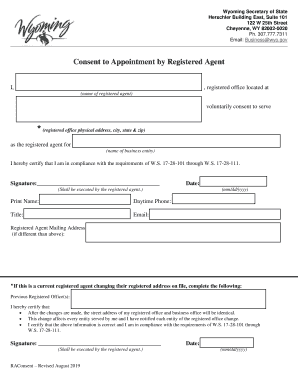
Wyoming Secretary of State Herschler Building East, Suite 101 122 W 25th Street Cheyenne, WY 820020020 Ph. 307.777.7311 Email: Business wyo.govConsent to Appointment by Registered Agent I,, registered.

How it works

  1. Open form

    Open form follow the instructions

  2. Easily sign form

    Easily sign the form with your finger

  3. Share form

    Send filled & signed form or save

How to fill out the WY SOS Consent To Appointment By Registered Agent online

The WY SOS Consent To Appointment By Registered Agent form is crucial for designating a registered agent for a business entity in Wyoming. This guide will provide clear, step-by-step instructions on how to complete the form online effectively.

Follow the steps to complete the form accurately.

  1. Click the ‘Get Form’ button to acquire the document and open it in the appropriate editor.
  2. Begin by entering your name as the registered agent in the first blank field. This identifies who is consenting to the appointment.
  3. Fill in the registered office physical address, including the city, state, and zip code. Ensure this address is accurate, as it represents where legal documents will be sent.
  4. Next, provide the name of the business entity that you will be representing as the registered agent.
  5. In the certification section, confirm your compliance with Wyoming Statutes 17-28-101 through 17-28-111. Your signature is required here to validate the information provided.
  6. Date the document by selecting the current date in the specified format (mm/dd/yyyy). This signifies when the consent was executed.
  7. Print your name in the designated field to clearly indicate your identity as the registered agent.
  8. Provide your daytime phone number, ensuring that it is a reachable contact for any official correspondence.
  9. Enter your email address so that further communications can be sent electronically, if necessary.
  10. If your registered office mailing address differs from the physical address given earlier, indicate that new mailing address in the appropriate section.
  11. If you are changing your registered address, fill out the previous registered office(s) section to confirm the changes you are making.
  12. Finally, certify the accuracy of the information provided in the form and sign it once more to complete the process.
  13. After completing all the sections, users can save changes, download the document, print it for their records, or share it as needed.

Start filling out your consent form online today to ensure your business has a registered agent in Wyoming.

Get form

Experience a faster way to fill out and sign forms on the web. Access the most extensive library of templates available.
Get form

Related content

Wyoming Secretary of State
Wyoming Secretary of State.
Learn more
Financial Regulators Gateway - The University of...
Website: http://soswy.state.wy.us/Investing/Default.aspx · WY SECURITIES STATUTES · WY...
Learn more
CMS 1500 ICD 10 WYOMING Manual CMS1500 4 1 17
In the event that the manual conflicts with a rule, the rule prevails. Wyoming State Rules...
Learn more

Related links form

Canada SC INS5210 2023 OH BMV 4826 2026 Canada SC ISP-1200 2026 CA DMV REG 227 2024

Get This Form Now!

Use professional pre-built templates to fill in and sign documents online faster. Get access to thousands of forms.
Get form
If you believe that this page should be taken down, please follow our DMCA take down processhere.
Get WY SOS Consent To Appointment By Registered Agent
Get form
  • Adoption
  • Bankruptcy
  • Contractors
  • Divorce
  • Home Sales
  • Employment
  • Identity Theft
  • Incorporation
  • Landlord Tenant
  • Living Trust
  • Name Change
  • Personal Planning
  • Small Business
  • Wills & Estates
  • Packages A-Z
  • Affidavits
  • Bankruptcy
  • Bill of Sale
  • Corporate - LLC
  • Divorce
  • Employment
  • Identity Theft
  • Internet Technology
  • Landlord Tenant
  • Living Wills
  • Name Change
  • Power of Attorney
  • Real Estate
  • Small Estates
  • Wills
  • All Forms
  • Forms A-Z
  • Other Templates
  • Legal Hub
  • About Us
  • Help Portal
  • Legal Resources
  • Blog
  • Affiliates
  • Contact Us
  • Delete My Account
  • Site Map
  • Industries
  • Forms in Spanish
  • Localized Forms
  • State-specific Forms
  • Forms Kit
  • Real Estate Handbook
  • All Guides
  • Notarize
  • Incorporation services
  • For Consumers
  • For Small Business
  • For Attorneys
  • USLegal
  • FormsPass
  • pdfFiller
  • signNow
  • altaFlow
  • DocHub
  • Instapage
Form Packages
  • Adoption
  • Bankruptcy
  • Contractors
  • Divorce
  • Home Sales
  • Employment
  • Identity Theft
  • Incorporation
  • Landlord Tenant
  • Living Trust
  • Name Change
  • Personal Planning
  • Small Business
  • Wills & Estates
  • Packages A-Z
Form Categories
  • Affidavits
  • Bankruptcy
  • Bill of Sale
  • Corporate - LLC
  • Divorce
  • Employment
  • Identity Theft
  • Internet Technology
  • Landlord Tenant
  • Living Wills
  • Name Change
  • Power of Attorney
  • Real Estate
  • Small Estates
  • Wills
  • All Forms
  • Forms A-Z
  • Other Templates
Customer Service
  • Legal Hub
  • About Us
  • Help Portal
  • Legal Resources
  • Blog
  • Affiliates
  • Contact Us
  • Delete My Account
  • Site Map
  • Industries
  • Forms in Spanish
  • Localized Forms
  • State-specific Forms
  • Forms Kit
Legal Guides
  • Real Estate Handbook
  • All Guides
Prepared for you
  • Notarize
  • Incorporation services
Our Customers
  • For Consumers
  • For Small Business
  • For Attorneys
Our Sites
  • USLegal
  • FormsPass
  • pdfFiller
  • signNow
  • altaFlow
  • DocHub
  • Instapage
Social Media
Call us now toll free:
+1 833 426 79 33
As seen in:
© Copyright 1999-2026 airSlate Legal Forms, Inc. 17 Station Street, Ste. 203, Brookline, MA 02445
  • Your Privacy Choices
  • Terms of Service
  • Privacy Notice
  • Content Takedown Policy
  • Bug Bounty Program