Loading
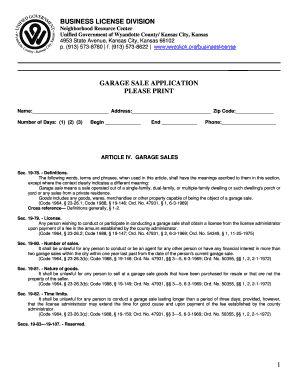
Get Wyandotte County Garage Sale Permit
How it works
-

Open form follow the instructions
-

Easily sign the form with your finger
-

Send filled & signed form or save
How to fill out the Wyandotte County Garage Sale Permit online
Filling out the Wyandotte County Garage Sale Permit online is a straightforward process. This guide will provide you with clear, step-by-step instructions to ensure that you successfully complete the form.
Follow the steps to fill out the garage sale permit online
- Click ‘Get Form’ button to access the garage sale permit form and open it in your preferred editing tool.
- Begin filling in your name as the person applying for the permit. Ensure that the name is printed clearly.
- Enter your address in the designated field, including the street address and ZIP code.
- Specify the number of days you intend to hold the garage sale by selecting 1, 2, or 3 from the available options.
- Indicate the start date of your garage sale in the ‘Begin’ section, ensuring the date is accurate.
- In the ‘End’ section, provide the date when your garage sale will conclude.
- Fill in your contact phone number so that you can be reached if needed.
- Review all the information you have entered to confirm its accuracy.
- Once you are satisfied with the information, you can save your changes, download, print, or share the form as required.
Complete your Wyandotte County Garage Sale Permit application online today!
Do I need a survey or permit in order to put up a fence? Surveys or permits are not required in order to build a fence 6 feet or less high. Additional fence restrictions are available from the Planning & Zoning office for your local Jurisdiction.