Loading
Form preview
  • US Legal Forms
  • Other Templates
  • More Forms
  • More Uncategorized Forms
  • Application For The Refund Of Payment For Approved Equipment Under ...

Get Application For The Refund Of Payment For Approved Equipment Under ...

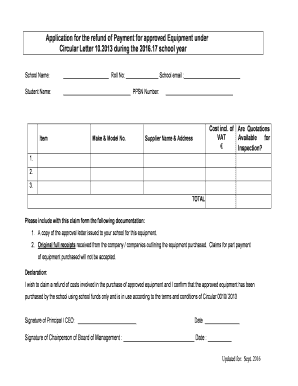
Application for the refund of Payment for approved Equipment under Circular Letter 10.2013 during the 2016.17 school year School Name: Roll No: School email : Student Name: PPSN Number: Item Make.

How it works

  1. Open form

    Open form follow the instructions

  2. Easily sign form

    Easily sign the form with your finger

  3. Share form

    Send filled & signed form or save

How to fill out the Application For The Refund Of Payment For Approved Equipment Under Circular Letter 10.2013 online

Filling out the Application for the Refund of Payment for Approved Equipment can be straightforward if you understand the required information and steps. This guide provides detailed instructions to help you navigate the form seamlessly.

Follow the steps to complete your application online.

  1. Click ‘Get Form’ button to access and open the application form in your editor.
  2. Fill in the school name, roll number, and school email in the designated fields at the top of the form.
  3. Provide the student's name and their Personal Public Service Number (PPSN) in the respective sections.
  4. Complete the item table by entering the equipment details. This includes the make and model number, the total cost inclusive of VAT, and ticking the box to indicate if quotations are available for inspection.
  5. List the names and addresses of the suppliers from whom the equipment was purchased in the provided fields.
  6. Calculate the total cost of the equipment and fill it in the TOTAL section at the bottom of the item table.
  7. Attach the required documentation to your claim form: a copy of the approval letter issued to your school and the original full receipts from the suppliers. Ensure that the receipts outline the total equipment purchased and that claims for part payments are not submitted.
  8. In the declaration section, confirm your intent to claim a refund and acknowledge that the equipment was purchased using school funds only.
  9. Obtain the required signatures from the principal or CEO and the chairperson of the board of management, along with the dates of the signatures.
  10. Once you have verified all entries and ensured the accuracy of details, save your changes. You can also download, print, or share the application form as needed.

Complete your application online today to ensure your refund request is processed promptly.

Get form

Experience a faster way to fill out and sign forms on the web. Access the most extensive library of templates available.
Get form

Related content

How to Apply for a Refund of Sales and Use Tax
Sep 10, 2019 — Fuel: Form FT-500, Application for Refund of Sales Tax Paid on Petroleum...
Learn more
7.9 Allowability of Costs/Activities
The allowability of costs under specific NIH awards may be subject to other ... an award...
Learn more
2017 Instructions for Form 1045 - Internal Revenue...
Dec 6, 2017 — Application for Tentative Refund ... equipment, furniture, software, or...
Learn more

Related links form

USCIS ATLANTA APPLICATION INQUIRY WORKSHEET APPLICANT The American Journey Unit 6 Form Uniform Support Declaration Oregon Fillable TS TSF SODA GUN FILLER SECTIONS - Perlick Corporation

Get This Form Now!

Use professional pre-built templates to fill in and sign documents online faster. Get access to thousands of forms.
Get form
If you believe that this page should be taken down, please follow our DMCA take down processhere.
Get Application For The Refund Of Payment For Approved Equipment Under ...
Get form
  • Adoption
  • Bankruptcy
  • Contractors
  • Divorce
  • Home Sales
  • Employment
  • Identity Theft
  • Incorporation
  • Landlord Tenant
  • Living Trust
  • Name Change
  • Personal Planning
  • Small Business
  • Wills & Estates
  • Packages A-Z
  • Affidavits
  • Bankruptcy
  • Bill of Sale
  • Corporate - LLC
  • Divorce
  • Employment
  • Identity Theft
  • Internet Technology
  • Landlord Tenant
  • Living Wills
  • Name Change
  • Power of Attorney
  • Real Estate
  • Small Estates
  • Wills
  • All Forms
  • Forms A-Z
  • Other Templates
  • Legal Hub
  • About Us
  • Help Portal
  • Legal Resources
  • Blog
  • Affiliates
  • Contact Us
  • Delete My Account
  • Site Map
  • Industries
  • Forms in Spanish
  • Localized Forms
  • State-specific Forms
  • Forms Kit
  • Real Estate Handbook
  • All Guides
  • Notarize
  • Incorporation services
  • For Consumers
  • For Small Business
  • For Attorneys
  • USLegal
  • FormsPass
  • pdfFiller
  • signNow
  • altaFlow
  • DocHub
  • Instapage
Form Packages
  • Adoption
  • Bankruptcy
  • Contractors
  • Divorce
  • Home Sales
  • Employment
  • Identity Theft
  • Incorporation
  • Landlord Tenant
  • Living Trust
  • Name Change
  • Personal Planning
  • Small Business
  • Wills & Estates
  • Packages A-Z
Form Categories
  • Affidavits
  • Bankruptcy
  • Bill of Sale
  • Corporate - LLC
  • Divorce
  • Employment
  • Identity Theft
  • Internet Technology
  • Landlord Tenant
  • Living Wills
  • Name Change
  • Power of Attorney
  • Real Estate
  • Small Estates
  • Wills
  • All Forms
  • Forms A-Z
  • Other Templates
Customer Service
  • Legal Hub
  • About Us
  • Help Portal
  • Legal Resources
  • Blog
  • Affiliates
  • Contact Us
  • Delete My Account
  • Site Map
  • Industries
  • Forms in Spanish
  • Localized Forms
  • State-specific Forms
  • Forms Kit
Legal Guides
  • Real Estate Handbook
  • All Guides
Prepared for you
  • Notarize
  • Incorporation services
Our Customers
  • For Consumers
  • For Small Business
  • For Attorneys
Our Sites
  • USLegal
  • FormsPass
  • pdfFiller
  • signNow
  • altaFlow
  • DocHub
  • Instapage
Social Media
Call us now toll free:
+1 833 426 79 33
As seen in:
© Copyright 1999-2026 airSlate Legal Forms, Inc. 17 Station Street, Ste. 203, Brookline, MA 02445
  • Your Privacy Choices
  • Terms of Service
  • Privacy Notice
  • Content Takedown Policy
  • Bug Bounty Program