Loading
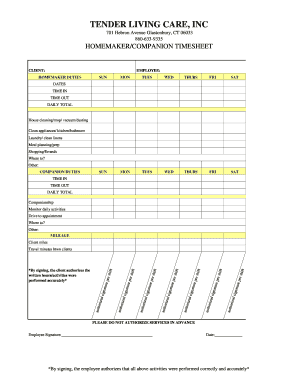
Get Homemaker/companion Time-sheet - Tender Living Care
How it works
-

Open form follow the instructions
-

Easily sign the form with your finger
-

Send filled & signed form or save
How to fill out the Homemaker/Companion Time-Sheet - Tender Living Care online
Filling out the Homemaker/Companion Time-Sheet accurately is essential for proper documentation of services rendered. This guide provides clear steps to complete the form online, ensuring all necessary information is captured efficiently.
Follow the steps to complete your time-sheet effectively.
- Press the ‘Get Form’ button to access the Homemaker/Companion Time-Sheet and open it in your preferred editing application.
- Begin by entering the client's name and your name in the respective fields at the top of the form. Ensure that these names are accurate to maintain proper records.
- Next, proceed to list the homemaker duties performed throughout the week. For each day, indicate 'Time In' and 'Time Out' for the services rendered, and calculate the 'Daily Total' hours.
- Detail the specific homemaker tasks completed for each day, including house cleaning, meal preparation, and any other related duties. If applicable, note any related errands or shopping activities.
- Move to the companion duties section, repeating the process of entering 'Time In,' 'Time Out,' and 'Daily Total' for each day, as you did for homemaker duties.
- In the mileage section, record the mileage driven for client-related trips, including any travel minutes between clients.
- After completing all sections, sign the form as the employee to certify that all activities performed were accurate. Ensure that the date of signing is also filled out.
- Lastly, review the filled-out form for any errors or omissions. Once confirmed, you can save your changes, download, print, or share the completed form as needed.
Complete your Homemaker/Companion Time-Sheet online today for accurate and efficient documentation.