Loading
Form preview
  • US Legal Forms
  • Form Library
  • Labor Forms
  • Hawaii Labor Forms
  • Hi Hrd 315 2013

Get Hi Hrd 315 2013-2026

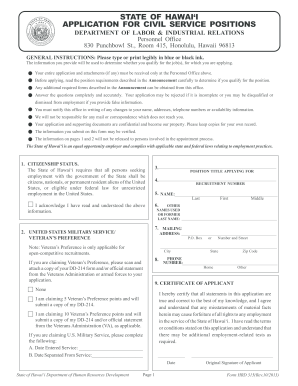
Ein may cause forfeiture of all rights to any employment in the service of the State of Hawai‘i. I have read the terms or conditions stated on this application and understand that there may be additional employment-related tests as required. Date State of Hawai‘i Department of Human Resources Development First Page 1 Original Signature of Applicant Form HRD 315(Rev.10/2013) STATE OF HAWAI‘I APPLICATION FOR CIVIL SERVICE POSITIONS The information on pages 1 and 2 will not be released .

How it works

  1. Open form

    Open form follow the instructions

  2. Easily sign form

    Easily sign the form with your finger

  3. Share form

    Send filled & signed form or save

How to fill out the HI HRD 315 online

The HI HRD 315 form is essential for individuals applying for civil service positions within the State of Hawai‘i. This guide provides comprehensive instructions to assist users in accurately completing this application online, ensuring a smooth submission process.

Follow the steps to successfully complete the HI HRD 315 form online.

  1. Click the ‘Get Form’ button to obtain the HI HRD 315 form and open it in your preferred online form editor.
  2. Begin by filling out your citizenship status by selecting the appropriate option indicating whether you are a citizen, national, permanent resident alien, or eligible for employment in the U.S.
  3. Enter the position title you are applying for in the designated field, along with the recruitment number provided in the job announcement.
  4. Provide your personal information, including your full name (last, first, middle), mailing address, and phone number. Ensure all entries are clear and legible.
  5. If applicable, indicate any veteran's preference by selecting the appropriate option and attaching the necessary documentation, such as a DD-214 form.
  6. Complete the certificate of applicant section, acknowledging that all statements are true and that you understand the potential consequences of providing false information.
  7. Answer the questions regarding your employment history and criminal history, providing detailed explanations as necessary if you respond 'Yes' to any questions.
  8. Detail your education and employment history, starting with your most recent or current position. Include all relevant information such as employer details, position title, and job duties.
  9. If necessary, provide additional experience on a separate sheet titled 'Experience,' ensuring all details are complete.
  10. Once all sections are completed, review your application for accuracy. You can then save changes, download, print, or share the form as needed.

Complete your HI HRD 315 application online today to ensure your submission for consideration.

Get form

Experience a faster way to fill out and sign forms on the web. Access the most extensive library of templates available.
Get form

Related content

state of hawaii
HRD's prior approval through HRD Form 397a, Request for Non-Civil. Service Temporary...
Learn more
Civil Service Hiring Packet
Form which certifies you as a Hawaiʻi Resident. HRD 315A, Civil Service Competitive...
Learn more
OWNER'S MANUAL
Correct mowing height can reduce weeds and lawn disease. ➢For best performance, grass...
Learn more

Related links form

SC Tuition & Required Fees 2015 SC Voter's Change of Address 2005 Stormwater Encroachment Permit - Horry County SD Aerial Applicator Form 2016

Questions & Answers

Get answers to your most pressing questions about US Legal Forms API.

Contact support

To secure an entry-level HR job, start by earning a relevant degree, and gaining certifications if possible. Networking within HR circles, attending job fairs, and joining professional organizations can create additional opportunities. Consider utilizing platforms like USLegalForms to find resources tailored to positions like HI HRD 315, which can guide you through your job search. Crafting a solid resume and preparing for interviews are essential steps on your career path.

The Department of Human Resources is responsible for managing employee relations, recruitment, benefits, and compliance within an organization. It ensures that the company aligns its workforce with its strategic goals while providing a supportive environment for staff. In the context of HI HRD 315, the department plays a key role in planning and implementing HRD initiatives that improve employee performance and satisfaction. Understanding this role can help organizations leverage HRD for better outcomes.

HRD, or Human Resource Development, is used to improve individual and organizational performance through training, education, and professional development. HI HRD 315 specifically addresses strategies and frameworks to foster effective HRD practices. By implementing HRD frameworks, organizations can enhance employee engagement and retention while ensuring that the workforce remains competitive and skilled.

CCSD T stands for the Clark County School District Teacher program. This initiative emphasizes training and support for educators in the region. In the context of HI HRD 315, understanding CCSD T is vital as it illustrates the commitment to educational excellence and professional development in teaching. By participating, teachers gain valuable skills that enhance their classroom effectiveness.

To effectively set up an employee HR file, gather all necessary documents and organize them in a logical manner. This can include contracts, performance evaluations, and attendance records. Utilizing a platform like HI HRD 315 ensures that your files are not only organized but also easily accessible for efficient HR management.

Setting up an HR system begins with identifying your organization's goals and the features you need. Consider software solutions that can integrate various HR functions such as payroll, employee records, and benefits administration. HI HRD 315 offers robust options that cater to diverse organizational needs, making your HR processes smoother.

To set up an employee HR file, collect essential documents including the employee's resume, job application, and tax forms. Ensure you keep this information up to date; using tools like HI HRD 315 can facilitate seamless updates and organization. This not only keeps information secure but also saves time for HR staff.

Organizing HR personnel files is essential for efficient HR management. Start by categorizing documents such as employment applications, performance reviews, and training records. Using a cloud-based solution, like those offered by HI HRD 315, can streamline this process and ensure secure, easy access to vital information.

DHRD stands for Department of Human Resources Development. This department often focuses on providing training, guidance, and support to enhance the capabilities of HR personnel. By understanding the functions of DHRD, you can better navigate systems like HI HRD 315 that offer comprehensive HR solutions.

Get This Form Now!

Use professional pre-built templates to fill in and sign documents online faster. Get access to thousands of forms.
Get form
If you believe that this page should be taken down, please follow our DMCA take down processhere.
Get HI HRD 315
Get form
  • Adoption
  • Bankruptcy
  • Contractors
  • Divorce
  • Home Sales
  • Employment
  • Identity Theft
  • Incorporation
  • Landlord Tenant
  • Living Trust
  • Name Change
  • Personal Planning
  • Small Business
  • Wills & Estates
  • Packages A-Z
  • Affidavits
  • Bankruptcy
  • Bill of Sale
  • Corporate - LLC
  • Divorce
  • Employment
  • Identity Theft
  • Internet Technology
  • Landlord Tenant
  • Living Wills
  • Name Change
  • Power of Attorney
  • Real Estate
  • Small Estates
  • Wills
  • All Forms
  • Forms A-Z
  • Form Library
  • Legal Hub
  • About Us
  • Help Portal
  • Legal Resources
  • Blog
  • Affiliates
  • Contact Us
  • Delete My Account
  • Site Map
  • Industries
  • Forms in Spanish
  • Localized Forms
  • State-specific Forms
  • Forms Kit
  • Real Estate Handbook
  • All Guides
  • Notarize
  • Incorporation services
  • For Consumers
  • For Small Business
  • For Attorneys
  • USLegal
  • FormsPass
  • pdfFiller
  • signNow
  • altaFlow
  • DocHub
  • Instapage
Form Packages
  • Adoption
  • Bankruptcy
  • Contractors
  • Divorce
  • Home Sales
  • Employment
  • Identity Theft
  • Incorporation
  • Landlord Tenant
  • Living Trust
  • Name Change
  • Personal Planning
  • Small Business
  • Wills & Estates
  • Packages A-Z
Form Categories
  • Affidavits
  • Bankruptcy
  • Bill of Sale
  • Corporate - LLC
  • Divorce
  • Employment
  • Identity Theft
  • Internet Technology
  • Landlord Tenant
  • Living Wills
  • Name Change
  • Power of Attorney
  • Real Estate
  • Small Estates
  • Wills
  • All Forms
  • Forms A-Z
  • Form Library
Customer Service
  • Legal Hub
  • About Us
  • Help Portal
  • Legal Resources
  • Blog
  • Affiliates
  • Contact Us
  • Delete My Account
  • Site Map
  • Industries
  • Forms in Spanish
  • Localized Forms
  • State-specific Forms
  • Forms Kit
Legal Guides
  • Real Estate Handbook
  • All Guides
Prepared for you
  • Notarize
  • Incorporation services
Our Customers
  • For Consumers
  • For Small Business
  • For Attorneys
Our Sites
  • USLegal
  • FormsPass
  • pdfFiller
  • signNow
  • altaFlow
  • DocHub
  • Instapage
Social Media
Call us now toll free:
+1 833 426 79 33
As seen in:
© Copyright 1999-2026 airSlate Legal Forms, Inc. 3720 Flowood Dr, Flowood, Mississippi 39232
  • Your Privacy Choices
  • Terms of Service
  • Privacy Notice
  • Content Takedown Policy
  • Bug Bounty Program