Loading
Get Wilsons Temperature Syndrome
How it works
-

Open form follow the instructions
-

Easily sign the form with your finger
-

Send filled & signed form or save
How to fill out the Wilsons Temperature Syndrome online
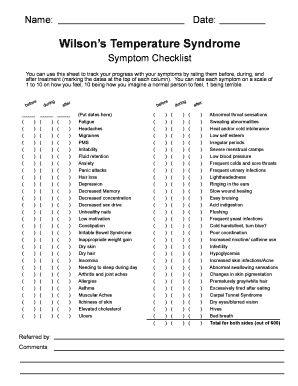
This guide provides clear instructions to assist users in filling out the Wilsons Temperature Syndrome form online. It aims to support individuals in tracking their symptoms effectively throughout their treatment process.
Follow the steps to complete the Wilsons Temperature Syndrome form with ease.
- Click the ‘Get Form’ button to access the Wilsons Temperature Syndrome form and open it in your desired editor.
- Begin filling out the 'Date' section at the top of the form. This will be essential for tracking your symptoms over time.
- Next, proceed to the 'Symptom Checklist' section. Here, you will see a range of symptoms listed. Rate each symptom on a scale of 1 to 10 based on how you are feeling, with 10 representing optimal health and 1 indicating severe distress.
- Make sure to mark the date for each symptom rating in the corresponding column. This helps in tracking how your symptoms fluctuate over the course of treatment.
- In the 'Referred by' field, indicate the name of the individual or professional who referred you for this treatment.
- Add any relevant 'Comments' regarding your treatment experience or symptom tracking that might be useful for your healthcare provider.
- Once all sections are complete, review your information for accuracy. You may then choose to save your changes, download, print, or share your document as needed.
Start filling out your Wilsons Temperature Syndrome form online today for effective symptom tracking.
WTS is consistent with inadequate thyroid stimulation of the cells even though the supply of thyroid hormone from the thyroid gland or thyroid medicine is normal (TSH thyroid blood test is normal). It is typically brought on by stress and is often reversible.