Loading
Get Treatment Form - Bprimeaestheticab
How it works
-

Open form follow the instructions
-

Easily sign the form with your finger
-

Send filled & signed form or save
How to fill out the Treatment Form - BPrimeAestheticab online
Filling out the Treatment Form - BPrimeAestheticab online is a straightforward process designed to help you provide important information for your treatment. This guide will lead you through each section and field, ensuring that your form is completed accurately and efficiently.
Follow the steps to successfully complete your form
- Click 'Get Form' button to obtain the form and open it in the editor.
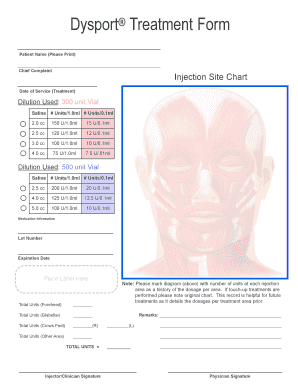
- Begin by entering the patient's name in the designated 'Patient Name (Please Print)' section. Ensure that the name is written clearly to avoid any confusion.
- In the 'Chief Complaint' field, provide a brief description of the main concern that led to the treatment. This information will help clinicians understand the patient's needs.
- Refer to the 'Injection Site Chart' and indicate the specific areas where injections will be administered. Mark each injection site clearly to guide the clinician during the procedure.
- For the 'Date of Service (Treatment)', enter the scheduled date when the treatment will take place. This helps in maintaining accurate records.
- Select the appropriate dilution under 'Dilution Used' based on the specific vial you're using. Fill in the corresponding units based on the selected dilution, for example, '150 U/1.0ml' and the total amounts in the designated fields.
- In the 'Medication Information' section, input the lot number and expiration date of the medication used. If available, place a label in the designated area for clarity.
- Record the total units administered for each area being treated, such as 'Total Units (Forehead)' and 'Total Units (Glabellar)'. This detailed record aids in future treatments.
- Utilize the provided diagram to mark the number of units administered at each injection area. This serves as a historical record for proper dosage tracking.
- If applicable, include any remarks or additional notes that may be relevant to the treatment in the remarks section.
- Finally, ensure that the 'Injector/Clinician Signature' and 'Physician Signature' sections are completed by the necessary professionals to authorize the treatment.
- Once all fields are filled out accurately, save the changes, download, print, or share the completed form as needed.
Complete your Treatment Form - BPrimeAestheticab online today to ensure a smooth and professional experience.
At the core of many decisions to undergo aesthetic treatments is the desire to enhance self-confidence. For countless individuals, these treatments offer a pathway to align their external appearance with their internal perception of themselves.