Loading
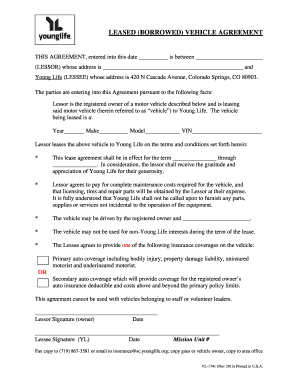
Get Borrowed Vehicle Agreement
How it works
-

Open form follow the instructions
-

Easily sign the form with your finger
-

Send filled & signed form or save
How to fill out the Borrowed Vehicle Agreement online
This guide is designed to assist you in completing the Borrowed Vehicle Agreement online. By following these steps, you will ensure that all necessary information is accurately recorded and that your agreement is valid and effective.
Follow the steps to complete the Borrowed Vehicle Agreement online.
- Click ‘Get Form’ button to obtain the Borrowed Vehicle Agreement and open it in the editor.
- In the first section, enter the date of the agreement in the designated space.
- Fill in the name of the lessor (the person or organization lending the vehicle) along with their address.
- In the space for the lessee, enter 'Young Life' along with the provided address of 420 N Cascade Avenue, Colorado Springs, CO 80903.
- Describe the vehicle being leased by entering the year, make, model, and VIN in the respective fields.
- Specify the effective term of the lease in the designated spaces for the start and end dates.
- Indicate that the lessor will cover maintenance costs, licensing, tires, and repair parts for the vehicle.
- List any additional individuals authorized to drive the vehicle in the designated field.
- Acknowledge that the vehicle is not to be used for non-Young Life interests.
- Select the type of insurance coverage you will provide for the vehicle: either primary or secondary, according to your situation.
- Ensure that all signatures are completed — the lessor and lessee must both sign and date the agreement.
- At the end, save your changes, and choose to download, print, or share the completed agreement as required.
Complete your Borrowed Vehicle Agreement online today to ensure a smooth vehicle borrowing experience.
A well-crafted payment agreement should cover the following elements: Details of the parties involved. Clearly identify the payer and payee, including contact information. Payment schedule. ... Total amount owed. ... Late payment policy. ... Method of payment. ... Default terms. ... Legal jurisdiction.