Loading
Get Registro De Proveedores Del Estado - Dgcpgobdo - Dgcp Gob
How it works
-

Open form follow the instructions
-

Easily sign the form with your finger
-

Send filled & signed form or save
How to fill out the REGISTRO DE PROVEEDORES DEL ESTADO - Dgcpgobdo - Dgcp Gob online
This guide provides a comprehensive overview of how to complete the REGISTRO DE PROVEEDORES DEL ESTADO form online. By following these detailed steps, users will be able to efficiently fill out the form and submit it accurately.
Follow the steps to complete the form successfully.
- Press the ‘Get Form’ button to access the form and open it in the editor.
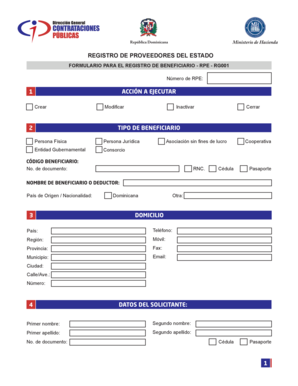
- In the 'Acción a ejecutar' section, select the action you wish to take: Create, Modify, Inactivate, or Close.
- Indicate the type of beneficiary in the 'Tipo de Beneficiario' section by choosing one of the options: Individual, Legal Entity, Government Entity, Consortium, or Non-profit Association.
- Fill in the 'Código Beneficiario' and the document number. You can use the RNC, ID card, or passport as applicable.
- In the 'Nombre de Beneficiario o Deducor' section, enter the name of the beneficiary or deductor, along with their country of origin or nationality.
- Complete the 'Domicilio' section by providing details such as address, phone numbers, region, province, municipality, email, city, street/avenue, and house number.
- Fill out the 'Datos del solicitante' section, including first name, second name, first surname, second surname, and document number.
- Provide the necessary banking information in the 'Autorización de acreditación de cuentas bancarias' section. This includes details like beneficiary bank, intermediary bank, account numbers, account names, account types, currencies, and banking contact information.
- In the 'Autorización' section, fill in your name, the type of document, position within the company, and company name, and confirm the authorization of the bank account for payments.
- Complete the 'Firmas autorizadas' section by entering the authorized signatories' names, document numbers, and obtaining their signatures.
- Review all your entries for accuracy, and once verified, you can save changes, download, print, or share the completed form.
Begin filling out your REGISTRO DE PROVEEDORES DEL ESTADO form online today to streamline the registration process.
Los proveedores interesados en ofrecer bienes y servicios al Ministerio de Hacienda deben cumplir con los siguientes requisitos: Contar con el Registro de Proveedores del Estado (RPE), según lo establecido en el portal https://.dgcp.gob.do/servicios/registro-de-proveedores/.