Loading
Form preview
  • US Legal Forms
  • Other Templates
  • More Forms
  • More Uncategorized Forms
  • Personal Wage Record - Dhh Louisiana

Get Personal Wage Record - Dhh Louisiana

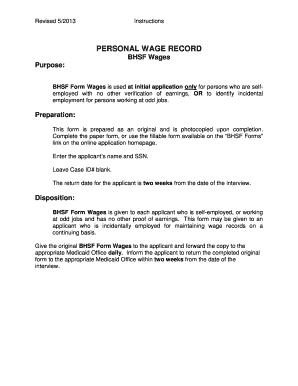
Revised 5/2013 Instructions PERSONAL WAGE RECORD BHSF Wages Purpose: BHSF Form Wages is used at initial application only for persons who are selfemployed with no other verification of earnings, OR.

How it works

  1. Open form

    Open form follow the instructions

  2. Easily sign form

    Easily sign the form with your finger

  3. Share form

    Send filled & signed form or save

How to fill out the PERSONAL WAGE RECORD - Dhh Louisiana online

The PERSONAL WAGE RECORD - Dhh Louisiana is a crucial document for individuals who are self-employed or have incidental employment. This guide provides step-by-step instructions to ensure that you accurately complete this form online.

Follow the steps to accurately complete your wage record.

  1. Click the ‘Get Form’ button to obtain the form and open it in your preferred online editor.
  2. Begin by entering the applicant’s full name in the designated field to ensure that all records are correctly associated with the individual.
  3. Next, enter the applicant’s Social Security Number (SSN) in the appropriate field. This step is vital for tracking and verifying the individual's wage information.
  4. Leave the Case ID# section blank, as per the instructions outlined for filling out the form.
  5. Complete the necessary details regarding any self-employment or incidental jobs the applicant might have. Be as detailed as possible to provide a complete record.
  6. Review all information entered for accuracy before submitting the form.
  7. Once you have completed the form, save your changes. You may then download, print, or share the completed document as required.

Complete your documents online to ensure a smooth application process.

Get form

Experience a faster way to fill out and sign forms on the web. Access the most extensive library of templates available.
Get form

Related content

PERSONAL WAGE RECORD
PERSONAL WAGE RECORD. BHSF Wages. Purpose: BHSF Form Wages is used at initial application...
Learn more
State Data Use Agreement Example (Louisiana)...
The Department of Health and Hospitals (DHH), through the Bureau of Health ... OPH, and...
Learn more
United States Department of Health and Human...
The United States Department of Health & Human Services (HHS), also known as the Health...
Learn more

Related links form

Zoning Amendment Form Jackson County Airport Board Meeting Agenda And Minutes Plumbing Permit Application Electrical Permit Application

Questions & Answers

Get answers to your most pressing questions about US Legal Forms API.

Contact support

Turn off Auto-format on iOS notes And prevent a Dash from being... go into your keyboard settings. go to Text Replacement. add a new shortcut. make the Shortcut -/ (for example) make the phrase "- " (add the space at the end)

Shake to Undo or Redo When you shake your device after you type, the system will display an “Undo Typing” prompt and display the option to either tap Cancel or Undo. A shake also allows you to undo a recent cut or paste action. The system makes a guess as to what you intend to undo.

A barrel will produce individual markings in addition to a bullet's land and groove impressions as the bullet passes through, and it is these unique markings that an examiner evaluates to determine whether a given bullet was fired from a particular firearm.

Highlight the text you want to edit. Press Ctrl+D on Windows or Command+D on Mac. Click the Strikethrough option under Effects in the middle of the window. Press OK.

Ctrl + 5 The easiest way to apply strikethrough formatting to a cell is to use the keyboard shortcut Ctrl + 5. Simply select the cell or cells you want to format and press Ctrl + 5. This will apply strikethrough formatting to the text in the cell.

In Notes, select the text to receive the Strike-through. Right-click on that selected text, and from the secondary menu, choose Font : Styles... A styles panel will slide down in Notes. Click Favorite Styles, and then choose Strike-through from the selector.

Keyboard shortcuts for Google Docs Common actionsBoldCtrl + bItalicizeCtrl + iUnderlineCtrl + uStrikethroughAlt + Shift + 5110 more rows

As the bullet is propelled through the barrel, the grooves exert a rotational force on the metal surface that's so strong it leaves marks. Under a microscope, these striae are all distinctive and different – and they will correspond to the grooves inside the barrel of the gun that fired the bullet.

Strikethrough Shortcuts If the above steps are hard for you to remember, you can use keyboard shortcuts to strikethrough in Google Docs instead: For Windows, once you have selected the text you want to cross out, press Alt+Shift+5. For Mac, press Command+Shift+X.

1. Ctrl + 5 - This shortcut key will instantly strikethrough any text that you have selected. Simply highlight the text that you want to strikethrough and then press Ctrl + 5 on your keyboard.

Get This Form Now!

Use professional pre-built templates to fill in and sign documents online faster. Get access to thousands of forms.
Get form
If you believe that this page should be taken down, please follow our DMCA take down processhere.
Get PERSONAL WAGE RECORD - Dhh Louisiana
Get form
  • Adoption
  • Bankruptcy
  • Contractors
  • Divorce
  • Home Sales
  • Employment
  • Identity Theft
  • Incorporation
  • Landlord Tenant
  • Living Trust
  • Name Change
  • Personal Planning
  • Small Business
  • Wills & Estates
  • Packages A-Z
  • Affidavits
  • Bankruptcy
  • Bill of Sale
  • Corporate - LLC
  • Divorce
  • Employment
  • Identity Theft
  • Internet Technology
  • Landlord Tenant
  • Living Wills
  • Name Change
  • Power of Attorney
  • Real Estate
  • Small Estates
  • Wills
  • All Forms
  • Forms A-Z
  • Other Templates
  • Legal Hub
  • About Us
  • Help Portal
  • Legal Resources
  • Blog
  • Affiliates
  • Contact Us
  • Delete My Account
  • Site Map
  • Industries
  • Forms in Spanish
  • Localized Forms
  • State-specific Forms
  • Forms Kit
  • Real Estate Handbook
  • All Guides
  • Notarize
  • Incorporation services
  • For Consumers
  • For Small Business
  • For Attorneys
  • USLegal
  • FormsPass
  • pdfFiller
  • signNow
  • altaFlow
  • DocHub
  • Instapage
Form Packages
  • Adoption
  • Bankruptcy
  • Contractors
  • Divorce
  • Home Sales
  • Employment
  • Identity Theft
  • Incorporation
  • Landlord Tenant
  • Living Trust
  • Name Change
  • Personal Planning
  • Small Business
  • Wills & Estates
  • Packages A-Z
Form Categories
  • Affidavits
  • Bankruptcy
  • Bill of Sale
  • Corporate - LLC
  • Divorce
  • Employment
  • Identity Theft
  • Internet Technology
  • Landlord Tenant
  • Living Wills
  • Name Change
  • Power of Attorney
  • Real Estate
  • Small Estates
  • Wills
  • All Forms
  • Forms A-Z
  • Other Templates
Customer Service
  • Legal Hub
  • About Us
  • Help Portal
  • Legal Resources
  • Blog
  • Affiliates
  • Contact Us
  • Delete My Account
  • Site Map
  • Industries
  • Forms in Spanish
  • Localized Forms
  • State-specific Forms
  • Forms Kit
Legal Guides
  • Real Estate Handbook
  • All Guides
Prepared for you
  • Notarize
  • Incorporation services
Our Customers
  • For Consumers
  • For Small Business
  • For Attorneys
Our Sites
  • USLegal
  • FormsPass
  • pdfFiller
  • signNow
  • altaFlow
  • DocHub
  • Instapage
Social Media
Call us now toll free:
+1 833 426 79 33
As seen in:
© Copyright 1999-2026 airSlate Legal Forms, Inc. 17 Station Street, Ste. 203, Brookline, MA 02445
  • Your Privacy Choices
  • Terms of Service
  • Privacy Notice
  • Content Takedown Policy
  • Bug Bounty Program