Loading
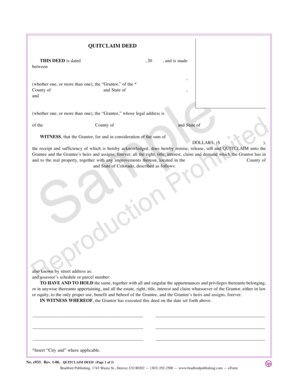
Get Colorado Quitclaim Deed - Bradford Publishing
How it works
-

Open form follow the instructions
-

Easily sign the form with your finger
-

Send filled & signed form or save
How to fill out the Colorado Quitclaim Deed - Bradford Publishing online
The Colorado Quitclaim Deed is a vital legal document used for transferring ownership of real property. This guide provides a comprehensive approach to filling out the Quitclaim Deed from Bradford Publishing online, ensuring that users understand each component and step of the process.
Follow the steps to complete the Quitclaim Deed accurately.
- Click the ‘Get Form’ button to access the Quitclaim Deed and open it in your preferred digital editor for completion.
- Begin by entering the date of the deed at the top of the form. This should include the day, month, and year when the deed is being executed.
- In the first section, identify the Grantor(s) by entering their names. Specify if there is more than one Grantor. Ensure that these names match the legal documents of the persons transferring ownership.
- Next, indicate the County and State where the property is located, ensuring accuracy in both entries.
- Following this, enter the Grantee(s) name(s) in the designated field. Include any additional Grantees if applicable.
- Provide the Grantee's legal address, making sure to include the County and State for clarity.
- In the section that acknowledges consideration, state the amount (in dollars) that the Grantor receives for the property transfer. This conveys that the transaction has been made for a tangible sum.
- Next, describe the property being transferred by entering its detailed legal description. Include the physical property address and the assessor’s schedule or parcel number to ensure precise identification.
- The following section affirms the Grantor's intent to transfer ownership, so ensure it reflects the accurate relationship and rights conveyed to the Grantee. Check the phrasing to verify it aligns with standard legal terminology.
- After completing the form, the Grantor must sign and date the document in the designated areas.
- Finally, the deed must be acknowledged by a Notary Public. Provide the Notary with the document for witnessing, and fill in any required fields, such as the Notary's commission expiration date.
- Once all steps are completed, save the document. You can choose to download, print, or share the completed Quitclaim Deed as necessary.
Start completing your Quitclaim Deed online to ensure a smooth property transfer process.
Most documents, legal size or smaller, are assessed a $13 recording fee for the first page and an additional $5 recording fee for each additional page. Transfer documents (Warranty Deeds, Quit Claim Deeds, etc) will be assessed a documentary tax if the consideration is $500 or more in addition to the recording fee.