Loading
Get Wa Dol Td-420-538 2019-2026
How it works
-

Open form follow the instructions
-

Easily sign the form with your finger
-

Send filled & signed form or save
How to fill out the WA DoL TD-420-538 online
Filling out the WA DoL TD-420-538 form online can be straightforward when you understand each section. This guide provides the necessary steps to successfully complete and submit the form.
Follow the steps to complete your form accurately.
- Click ‘Get Form’ button to access the WA DoL TD-420-538 and open it for editing.
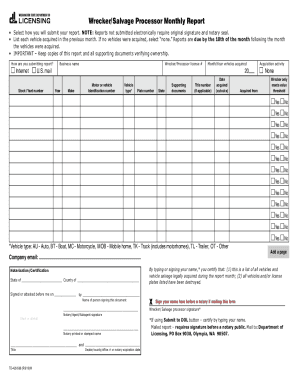
- Select how you will submit your report by choosing either 'Internet' or 'U.S. mail'. Note that reports submitted by mail must include an original signature and notary seal.
- Enter your business name and the wrecker/processor license number.
- Indicate the month and year during which vehicles were acquired.
- List each vehicle acquired during the previous month. If no vehicles were acquired, select 'none'. Ensure that your reports are submitted by the 10th of the following month.
- For each vehicle, fill in the make, model or vehicle identification number, vehicle type, plate number, state, title number (if applicable), date acquired, and the name of the person or entity from whom the vehicle was acquired.
- Provide supporting documents verifying ownership for the vehicles listed.
- Complete the notarization section by filling in the name of the person signing the document, and ensure the notary public completes their section with their signature, printed name, title, and seal.
- Sign the document either electronically or, if mailing, your signature must be notarized.
- Choose to save your changes, and consider downloading or printing for your records. If you are ready to submit, click the ‘Submit to DOL’ button.
Start completing the WA DoL TD-420-538 online now for a smooth submission process.