Loading
Get Au Vl 17 2020-2026
How it works
-

Open form follow the instructions
-

Easily sign the form with your finger
-

Send filled & signed form or save
How to fill out the AU VL 17 online
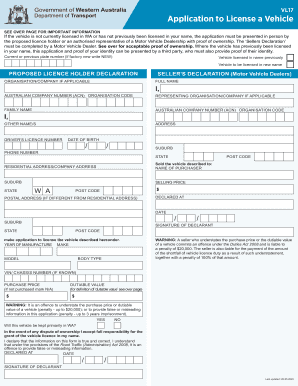
The AU VL 17 form is essential for individuals applying to license a vehicle in Western Australia. Understanding its components and how to fill it out online is crucial for a seamless application process.
Follow the steps to successfully complete the AU VL 17 form online.
- Press the ‘Get Form’ button to access the AU VL 17 document and open it for editing.
- Begin by entering the current or previous plate number. If the vehicle is factory new, indicate this by writing 'NEW'.
- Specify whether the vehicle was previously licensed in your name or will be licensed in a new name.
- Complete the proposed licence holder declaration section by providing personal details including full name, address, and driver’s licence number.
- If applicable, fill out the seller’s declaration section which includes the seller’s name, organisation details, and sale information.
- Provide the vehicle details such as year of manufacture, make, model, body type, and VIN/chassis number.
- Indicate the purchase price and dutiable value. If not applicable, mark 'N/A'.
- Answer whether the vehicle will be primarily kept in Western Australia.
- Accept full responsibility for licensing the vehicle in your name by signing and dating the declaration.
- Review all entered information for accuracy before saving or submitting the document. Download, print, or share the form as necessary.
Complete your AU VL 17 form online today for a smooth vehicle licensing process.