Loading
Form preview
  • US Legal Forms
  • Other Templates
  • More Forms
  • More Multi-State Forms
  • Motor Vehicle Drivers Certificate Of Violations

Get Motor Vehicle Drivers Certificate Of Violations

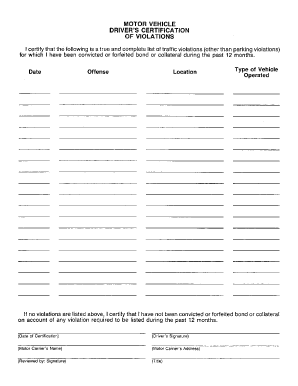
MOTOR VEHICLE. DRIVER'S CERTIFICATION. OF VIOLATIONS. I certify that the following is a true and complete list of traffic violations (other than parking .

How it works

  1. Open form

    Open form follow the instructions

  2. Easily sign form

    Easily sign the form with your finger

  3. Share form

    Send filled & signed form or save

How to fill out the Motor Vehicle Drivers Certificate Of Violations online

Filling out the Motor Vehicle Drivers Certificate Of Violations online is a straightforward process that ensures your driving record is accurately maintained. This guide will walk you through each step to ensure you complete the form efficiently and correctly.

Follow the steps to successfully complete the form online.

  1. Click ‘Get Form’ button to access the Motor Vehicle Drivers Certificate Of Violations and open it in the editor.
  2. In the first section of the form, provide your personal information, including your full name, address, and contact details. Make sure to fill in each field accurately to avoid delays.
  3. Next, you will be required to include your driver's license number and state of issuance. Ensure this information matches the records associated with your license.
  4. Proceed to the section where you will list any violations. For each violation, include the date, nature of the violation, and any associated case numbers if available.
  5. Review the details you've entered for accuracy. It is essential to ensure that all information is correct before submission.
  6. After verifying the information, you can save changes. You may also download the completed form, print it out for your records, or share it as required.

Complete your documents online with confidence today!

Get form

Experience a faster way to fill out and sign forms on the web. Access the most extensive library of templates available.
Get form

Related content

Annual Driver's Certification of Violations
MOTOR CARRIER INSTRUCTIONS: Each motor carrier must at least once every 12 months, require...
Learn more
49 CFR § 391.27 - Record of violations. | CFR |...
(c) The form of the driver's list or certification shall be prescribed by the motor...
Learn more
Guide to Oregon Driving Records - State of Oregon
The certified court print with CDL medical certification driving record is a...
Learn more

Related links form

UCC-DocumentSubmissionForm Brass Methods College Document # COAS024 UCC Document # Date Received CATALOG YEAR 20102011 (Please Use Separate College Document # COAS037 UCC Document # Date Received CATALOG YEAR 20102011 (Please Use Separate College Document # COAS FPA 010(r) UCC Document # Date Received CATALOG YEAR 200810 (Please Use

Questions & Answers

Get answers to your most pressing questions about US Legal Forms API.

Contact support

A Helm chart is a package that contains all the necessary resources to deploy an application to a Kubernetes cluster. This includes YAML configuration files for deployments, services, secrets, and config maps that define the desired state of your application.

Package/push and then deploy This is the recommended approach when using Helm. First, you package and push the Helm chart into a repository, and then you deploy it to your cluster. This way your Helm repository shows a registry of the applications that run on your cluster.

The Chart. lock file lists the exact versions of immediate dependencies and their dependencies and so on.

It will pull down the latest charts that satisfy the dependencies, and clean up old dependencies. On successful update, this will generate a lock file that can be used to rebuild the dependencies to an exact version. Dependencies are not required to be represented in 'Chart. yaml'.

Store Helm charts in Artifact Registry Create a private repository in Artifact Registry. Create a sample chart. Authenticate with the repository. Push the chart to the repository. Deploy the chart.

Build is used to reconstruct a chart's dependencies to the state specified in the lock file. This will not re-negotiate dependencies, as 'helm dependency update' does. If no lock file is found, 'helm dependency build' will mirror the behavior of 'helm dependency update'.

lock file lists the exact versions of immediate dependencies and their dependencies and their dependencies and so forth. This allows helm to precisely track the entire dependency tree and recreate it exactly as it last worked--even if some of the dependencies (or their dependencies) are updated later.

Step 1: Update your Helm chart Start by navigating to the chart's directory on your local machine or repository. Check for any new releases or updates available for the chart. If there are updates, you can either pull them from the chart repository or manually update the chart files.

Get This Form Now!

Use professional pre-built templates to fill in and sign documents online faster. Get access to thousands of forms.
Get form
If you believe that this page should be taken down, please follow our DMCA take down processhere.
Get Motor Vehicle Drivers Certificate Of Violations
Get form

Form categories

Real Estate
  • Home Sale
  • Deeds
  • Leases
  • Landlord Tenant
  • First Refusal Agreement
  • Lis Pendens
  • View all Real Estate
Business & Commercial
  • Small Business
  • Contracts
  • Construction
  • Employment
  • Limited Liability Company
  • Partnerships
  • View all Business & Commercial
Estate Planning
  • Personal Planning
  • Last Will and Testament
  • Living Trust
  • Power of Attorney
  • Living Will (Healthcare Directive)
  • Probate
  • Trusts
  • Small Estate
  • View all Estate Planning

Other Legal Areas

  • Civil Actions
  • Civil Procedure
  • Animals
  • Affidavits
  • Bill of Sale
  • Oil Gas and Minerals
  • Name Change
  • Other
Family Law
  • Divorce
  • Annulment
  • Adoption
  • Marriage
  • Child Justice
  • View all Family Law
  • Forms Catalog
  • Other Templates

Company

  • About Us
  • Pricing
  • Legal Hub
  • Affiliate Program

Knowledge Base

  • Help Portal
  • Legal Resources
  • Blog
  • Industries
  • Legal Guides
  • Sitemap

Services

  • Notarize
  • Form Selector

Support

  • Contact Us
  • Delete My Account

Products

  • USLegal
  • FormsPass
  • pdfFiller
  • signNow
  • altaFlow
  • DocHub
  • Instapage
Social Media
Call us now toll free:
+1 833 426 79 33
As seen in:
© 2026 US Legal Forms. All rights reserved.
  • Your Privacy Choices
  • Terms of Service
  • Privacy Notice
  • Content Takedown Policy
  • Bug Bounty Program