Loading
Form preview
  • US Legal Forms
  • Other Templates
  • More Forms
  • More Uncategorized Forms
  • Hahira Honeybee Dog Show Registration Form

Get Hahira Honeybee Dog Show Registration Form

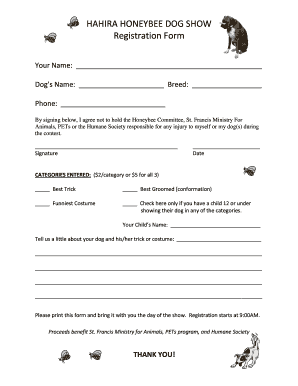
HAHIRA HONEYBEE DOG SHOW Registration Form Your Name: Dog s Name: Breed: Phone: By signing below, I agree not to hold the Honeybee Committee, St. Francis Ministry For Animals, PETs or the Humane Society.

How it works

  1. Open form

    Open form follow the instructions

  2. Easily sign form

    Easily sign the form with your finger

  3. Share form

    Send filled & signed form or save

How to fill out the HAHIRA HONEYBEE DOG SHOW Registration Form online

Filling out the HAHIRA HONEYBEE DOG SHOW Registration Form online is a simple and straightforward process. This guide provides step-by-step instructions to help you successfully complete the registration for your dog’s participation in the show.

Follow the steps to complete your registration form efficiently.

  1. Click the ‘Get Form’ button to obtain the registration form and open it in your selected editor.
  2. Begin by entering your name in the designated field at the top of the form. This ensures that the registration is linked to you as the participant.
  3. Next, fill in your dog’s name and breed in the appropriate sections. Accurate information helps in identifying your pet during the show.
  4. Provide your phone number so that the event organizers can reach you if necessary. Ensure that the number is current and correct.
  5. Sign the form at the bottom to acknowledge that you do not hold the Honeybee Committee, St. Francis Ministry For Animals, or the Humane Society responsible for any injuries during the contest.
  6. Indicate the categories you are entering by marking ‘Best Trick,’ ‘Best Groomed (conformation),’ and/or ‘Funniest Costume.’ Each category has a fee of $2, or you can enter all three for a total of $5.
  7. If you have a child aged 12 or under showing their dog, check the appropriate box and provide the child's name in the designated space.
  8. In the text box provided, give a brief description of your dog and the trick or costume they will be showcasing. This adds a personal touch and may help the judges.
  9. Once all information is filled in, review the form for accuracy and completeness. Make any necessary corrections before finalizing.
  10. Finally, save the changes, and choose to download, print, or share the completed form as needed to bring it with you on the show day, starting at 9:00 AM.

Start your registration process online and ensure your dog's participation in the HAHIRA HONEYBEE DOG SHOW!

Get form

Experience a faster way to fill out and sign forms on the web. Access the most extensive library of templates available.
Get form

Related content

Uncategorised - City of Hahira
The Hahira Fire Department provides 24-hour staffing, utilizing 7 full-time and 6...
Learn more
field notes - Valdosta State University Archives...
Oct 5, 1996 — (other fieldworkers indicated in subheadings of particular entry; if no...
Learn more

Related links form

Employee Forms Bginis Gov Bb Download - National Insurance Scheme - Nis Gov Allardusa Com Warranty Online Submission Ministry Of Education Application Form

Get This Form Now!

Use professional pre-built templates to fill in and sign documents online faster. Get access to thousands of forms.
Get form
If you believe that this page should be taken down, please follow our DMCA take down processhere.
Get HAHIRA HONEYBEE DOG SHOW Registration Form
Get form
  • Adoption
  • Bankruptcy
  • Contractors
  • Divorce
  • Home Sales
  • Employment
  • Identity Theft
  • Incorporation
  • Landlord Tenant
  • Living Trust
  • Name Change
  • Personal Planning
  • Small Business
  • Wills & Estates
  • Packages A-Z
  • Affidavits
  • Bankruptcy
  • Bill of Sale
  • Corporate - LLC
  • Divorce
  • Employment
  • Identity Theft
  • Internet Technology
  • Landlord Tenant
  • Living Wills
  • Name Change
  • Power of Attorney
  • Real Estate
  • Small Estates
  • Wills
  • All Forms
  • Forms A-Z
  • Other Templates
  • Legal Hub
  • About Us
  • Help Portal
  • Legal Resources
  • Blog
  • Affiliates
  • Contact Us
  • Delete My Account
  • Site Map
  • Industries
  • Forms in Spanish
  • Localized Forms
  • State-specific Forms
  • Forms Kit
  • Real Estate Handbook
  • All Guides
  • Notarize
  • Incorporation services
  • For Consumers
  • For Small Business
  • For Attorneys
  • USLegal
  • FormsPass
  • pdfFiller
  • signNow
  • altaFlow
  • DocHub
  • Instapage
Form Packages
  • Adoption
  • Bankruptcy
  • Contractors
  • Divorce
  • Home Sales
  • Employment
  • Identity Theft
  • Incorporation
  • Landlord Tenant
  • Living Trust
  • Name Change
  • Personal Planning
  • Small Business
  • Wills & Estates
  • Packages A-Z
Form Categories
  • Affidavits
  • Bankruptcy
  • Bill of Sale
  • Corporate - LLC
  • Divorce
  • Employment
  • Identity Theft
  • Internet Technology
  • Landlord Tenant
  • Living Wills
  • Name Change
  • Power of Attorney
  • Real Estate
  • Small Estates
  • Wills
  • All Forms
  • Forms A-Z
  • Other Templates
Customer Service
  • Legal Hub
  • About Us
  • Help Portal
  • Legal Resources
  • Blog
  • Affiliates
  • Contact Us
  • Delete My Account
  • Site Map
  • Industries
  • Forms in Spanish
  • Localized Forms
  • State-specific Forms
  • Forms Kit
Legal Guides
  • Real Estate Handbook
  • All Guides
Prepared for you
  • Notarize
  • Incorporation services
Our Customers
  • For Consumers
  • For Small Business
  • For Attorneys
Our Sites
  • USLegal
  • FormsPass
  • pdfFiller
  • signNow
  • altaFlow
  • DocHub
  • Instapage
Social Media
Call us now toll free:
+1 833 426 79 33
As seen in:
© Copyright 1999-2026 airSlate Legal Forms, Inc. 17 Station Street, Ste. 203, Brookline, MA 02445
  • Your Privacy Choices
  • Terms of Service
  • Privacy Notice
  • Content Takedown Policy
  • Bug Bounty Program