Loading
Get Practice Word Endings -ice -ise -ize - Olean City School District - Oleanschools
How it works
-

Open form follow the instructions
-

Easily sign the form with your finger
-

Send filled & signed form or save
How to fill out the PRACTICE Word Endings -ice -ise -ize - Olean City School District - Oleanschools online
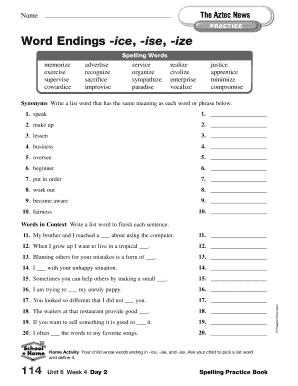
This guide provides users with step-by-step instructions on how to effectively fill out the PRACTICE Word Endings -ice -ise -ize form for the Olean City School District. It aims to make the process clear and straightforward for all users, regardless of their prior experience with online document management.
Follow the steps to complete your form successfully
- Click the ‘Get Form’ button to access the form and open it for editing.
- Begin by identifying the spelling words listed in the document. These words will be crucial for your task and should be clearly understood before proceeding.
- Move to the synonyms section. Here, you will be asked to write a word that has the same meaning as specified words or phrases. Carefully consider each word to provide accurate synonyms.
- Continue to the home activity section. Instruct your child to select a word from the spelling list and define it, engaging them in the learning process.
- Next, address the 'Words in Context' section by completing each sentence with a list word. This will help reinforce the vocabulary you have practiced.
- After filling out all sections thoroughly, review your entries for accuracy and completeness. Ensure that all required fields are filled and make any necessary corrections.
- Once you are satisfied with the form, you can save your changes, download a copy, print it, or share it as required.
Complete your documents online today for a smoother and more efficient process.