Loading
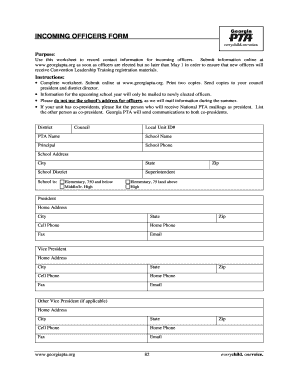
Get Incoming Officers Form - Georgia Pta - Georgiapta
How it works
-

Open form follow the instructions
-

Easily sign the form with your finger
-

Send filled & signed form or save
How to fill out the Incoming Officers Form - Georgia PTA - Georgiapta online
This guide provides comprehensive instructions on how to accurately complete the Incoming Officers Form for the Georgia PTA online. By following these steps, users can ensure that they correctly submit the necessary information for their newly elected officers.
Follow the steps to fill out the Incoming Officers Form online.
- Press the ‘Get Form’ button to access the Incoming Officers Form, then open it in your preferred editor.
- Begin by entering the 'District' information in the designated field.
- Fill in the 'Council' details, ensuring all information is accurate.
- Provide the 'Local Unit ID#' and 'PTA Name' as required.
- Enter the 'School Name' along with the 'Principal's' details.
- Complete the 'School Phone' and 'School Address' sections, including 'City', 'State', and 'Zip' code.
- Specify the 'School District' and the 'Superintendent's' name.
- Indicate the school level (Elementary, Middle/Jr. High, or High) and whether it is classified as 750 and below, 751 and above, or Middle/Jr. High.
- For each officer position (President, Vice President, Secretary, Treasurer), fill in the 'Home Address', 'Cell Phone', 'Home Phone', 'Fax', 'Email', and 'Zip' code as needed.
- If applicable, replicate the process for additional vice presidents and secretaries.
- Once all fields are completed, review the information for accuracy.
- Save changes to the form, then proceed to download, print, or share it as necessary.
Complete the Incoming Officers Form online now to ensure your officers receive important materials.
Individuals and local units can take advantage of a host of benefits from PTA membership including discounts and offers from member benefits providers and sponsors, magazine subscriptions, leadership training, e-newsletters and much more.