Loading
Form preview
  • US Legal Forms
  • Other Templates
  • More Forms
  • More Uncategorized Forms
  • Student Sport Participation Form - Lucia Mar

Get Student Sport Participation Form - Lucia Mar

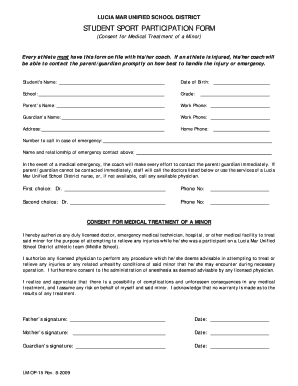
LUCIA MAR UNIFIED SCHOOL DISTRICT STUDENT SPORT PARTICIPATION FORM (Consent for Medical Treatment of a Minor) Every athlete must have this form on file with his/her coach. If an athlete is injured,.

How it works

  1. Open form

    Open form follow the instructions

  2. Easily sign form

    Easily sign the form with your finger

  3. Share form

    Send filled & signed form or save

How to fill out the STUDENT SPORT PARTICIPATION FORM - Lucia Mar online

Filling out the Student Sport Participation Form is essential for ensuring that all necessary information is available for a minor's medical treatment in case of an emergency during sports activities. This guide provides clear, step-by-step instructions to assist users in completing the form with confidence.

Follow the steps to accurately complete the form online.

  1. Press the ‘Get Form’ button to access the Student Sport Participation Form and open it in your preferred online editor.
  2. Begin by entering the student's name in the designated field. Ensure correct spelling to avoid any confusion during emergencies.
  3. Enter the student's date of birth, ensuring the format aligns with any specific requirements stated in the form.
  4. Fill in the student's school name in the appropriate section, reflecting their current educational institution.
  5. Indicate the student’s current grade, as this helps in identifying the level of sport participation.
  6. Provide the parent's name in the designated area, making it clear who is responsible for consent.
  7. Input the parent's work phone number to ensure they can be reached during school hours.
  8. In the guardian’s section, if applicable, enter their name and work phone number for additional emergency contact options.
  9. Fill out the home phone number to provide another means of communication during emergencies.
  10. Complete the emergency contact section by providing the name and relationship of the person who should be contacted if the parent or guardian is unavailable.
  11. List the first choice and second choice doctors along with their phone numbers for medical emergencies.
  12. Review the consent statement provided in the form. Ensure you understand the terms before agreeing.
  13. Finally, gather signatures for the father, mother, and guardian, along with dates, confirming that all information provided is accurate and that consent is given.
  14. Once all fields are completed, save changes, and download a copy of the form, or print it for submission as required.

Complete the Student Sport Participation Form online today to ensure your athlete is ready for their sporting activities.

Get form

Experience a faster way to fill out and sign forms on the web. Access the most extensive library of templates available.
Get form

Related content

official ballot november 8, 2016 consolidated...
Nov 8, 2016 — requirement that public schools ensure students obtain English ... Lucia...
Learn more
Catherine Hennelly - Allan Hancock College...
She taught in the Lucia Mar Unified School District for nearly 20 years. Hennelly was the...
Learn more
Andalusia - Wikipedia
Andalusia is the southern autonomous community in Peninsular Spain. It is the most...
Learn more

Related links form

Hasaweb BOARD OF INTERMEDIATE EDUCATION ANDHRA PRADESH HYDERABAD - Bieap Gov FORM - V - Board Of Intermediate Education Abieap

Questions & Answers

Get answers to your most pressing questions about US Legal Forms API.

Contact support

A Statement of Work (SOW) is a formal document that defines the entire scope of work involved for a vendor and clarifies deliverables, costs, and timeline. It is needed when a project involves vendors and external contributors in addition to the internal project team.

Common elements of an SOW include: Project objectives. Project scope. Major deliverables. Tasks that support the deliverables, and which party will complete them. Timeline for completion of work. Location of work and resources, equipment, and facilities needed. Payment costs, terms, and deadlines.

Statement of Work (SOW)

A Statement of Work, often known as an SOW, is a business agreement that outlines deliverables and project goals. It's created to keep everyone on the same page about deadlines, scope of work, and project expectations.

A Statement of Work (SOW) is an integral part of an organization's procurement process. It is a formal document that exists to provide direction to a vendor or contractor about how the work of a project is intended to be performed.

You always begin the statement of work with an introduction. This section introduces each key stakeholder in the project, i.e., the client, the agency, and third-party stakeholders, if any. The introduction is also where you briefly define the project and the work that needs to be completed.

One key benefit is cost savings. By outlining exactly what work needs to be done, SOWs eliminate any ambiguity in project scope and prevent overbilling by vendors. SOWs also allow for competitive bidding which can result in lower costs. Another advantage is improved vendor management.

Get This Form Now!

Use professional pre-built templates to fill in and sign documents online faster. Get access to thousands of forms.
Get form
If you believe that this page should be taken down, please follow our DMCA take down processhere.
Get STUDENT SPORT PARTICIPATION FORM - Lucia Mar
Get form
  • Adoption
  • Bankruptcy
  • Contractors
  • Divorce
  • Home Sales
  • Employment
  • Identity Theft
  • Incorporation
  • Landlord Tenant
  • Living Trust
  • Name Change
  • Personal Planning
  • Small Business
  • Wills & Estates
  • Packages A-Z
  • Affidavits
  • Bankruptcy
  • Bill of Sale
  • Corporate - LLC
  • Divorce
  • Employment
  • Identity Theft
  • Internet Technology
  • Landlord Tenant
  • Living Wills
  • Name Change
  • Power of Attorney
  • Real Estate
  • Small Estates
  • Wills
  • All Forms
  • Forms A-Z
  • Other Templates
  • Legal Hub
  • About Us
  • Help Portal
  • Legal Resources
  • Blog
  • Affiliates
  • Contact Us
  • Delete My Account
  • Site Map
  • Industries
  • Forms in Spanish
  • Localized Forms
  • State-specific Forms
  • Forms Kit
  • Real Estate Handbook
  • All Guides
  • Notarize
  • Incorporation services
  • For Consumers
  • For Small Business
  • For Attorneys
  • USLegal
  • FormsPass
  • pdfFiller
  • signNow
  • altaFlow
  • DocHub
  • Instapage
Form Packages
  • Adoption
  • Bankruptcy
  • Contractors
  • Divorce
  • Home Sales
  • Employment
  • Identity Theft
  • Incorporation
  • Landlord Tenant
  • Living Trust
  • Name Change
  • Personal Planning
  • Small Business
  • Wills & Estates
  • Packages A-Z
Form Categories
  • Affidavits
  • Bankruptcy
  • Bill of Sale
  • Corporate - LLC
  • Divorce
  • Employment
  • Identity Theft
  • Internet Technology
  • Landlord Tenant
  • Living Wills
  • Name Change
  • Power of Attorney
  • Real Estate
  • Small Estates
  • Wills
  • All Forms
  • Forms A-Z
  • Other Templates
Customer Service
  • Legal Hub
  • About Us
  • Help Portal
  • Legal Resources
  • Blog
  • Affiliates
  • Contact Us
  • Delete My Account
  • Site Map
  • Industries
  • Forms in Spanish
  • Localized Forms
  • State-specific Forms
  • Forms Kit
Legal Guides
  • Real Estate Handbook
  • All Guides
Prepared for you
  • Notarize
  • Incorporation services
Our Customers
  • For Consumers
  • For Small Business
  • For Attorneys
Our Sites
  • USLegal
  • FormsPass
  • pdfFiller
  • signNow
  • altaFlow
  • DocHub
  • Instapage
Social Media
Call us now toll free:
+1 833 426 79 33
As seen in:
© Copyright 1999-2026 airSlate Legal Forms, Inc. 17 Station Street, Ste. 203, Brookline, MA 02445
  • Your Privacy Choices
  • Terms of Service
  • Privacy Notice
  • Content Takedown Policy
  • Bug Bounty Program