Loading
Form preview
  • US Legal Forms
  • Other Templates
  • More Forms
  • More Uncategorized Forms
  • Bmj Consent Form

Get Bmj Consent Form

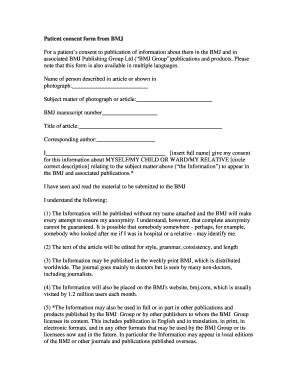
Patient consent form from BMJ For a patient s consent to publication of information about them in the BMJ and in associated BMJ Publishing Group Ltd ( BMJ Group )publications and products. Please.

How it works

  1. Open form

    Open form follow the instructions

  2. Easily sign form

    Easily sign the form with your finger

  3. Share form

    Send filled & signed form or save

How to fill out the Bmj Consent Form online

Filling out the Bmj Consent Form online is a straightforward process that allows individuals to consent to the use of information about themselves in publications by the BMJ. This guide provides clear and supportive instructions to help users complete the form accurately and efficiently.

Follow the steps to fill out the Bmj Consent Form online

  1. Press the ‘Get Form’ button to access the Bmj Consent Form. This will open the form for you to complete in an online editor.
  2. Begin by entering the name of the person described in the article or shown in the photograph in the designated field.
  3. Next, specify the subject matter of the photograph or article that relates to the provided information.
  4. Input the BMJ manuscript number in the specified area.
  5. Fill out the title of the article in the appropriate section of the form.
  6. Indicate the corresponding author's name clearly in the designated box.
  7. Read the statement provided about consent. Then write your full name in the area designated for the consent giver.
  8. Circle the correct description regarding the relationship to the individual being represented: 'myself', 'my child or ward', or 'my relative'.
  9. Review the understanding statements carefully, acknowledging your consent and understanding of how the information will be used.
  10. Finally, sign the form and enter the date in the specified fields to validate your consent.
  11. Once the form is completed, you can save your changes, download a copy, print it, or share it as needed.

Complete your consent form online today to ensure your information is correctly shared with the BMJ.

Get form

Experience a faster way to fill out and sign forms on the web. Access the most extensive library of templates available.
Get form

Related content

Videos, photographs, and patient consent - NCBI...
1. Hood CA, Hope T, Dove P. Videos, photographs, and patient consent. BMJ. ... described...
Learn more
CONSENT FORM FOR CASE REPORTS
For a patient's consent to publication of information about them in a journal or thesis...
Learn more
Case report - Wikipedia
In medicine, a case report is a detailed report of the symptoms, signs, diagnosis...
Learn more

Related links form

Dfs K4 1019 Dfs K4 1453 Fillable THE DEPARTMENT OF FINANCIAL SERVICES Dd 2052

Questions & Answers

Get answers to your most pressing questions about US Legal Forms API.

Contact support

It is preferred that all City, State, and ZIP Code information be on a single line. If that is not possible, the ZIP Code, including the ZIP+4 Code, may be placed below the city/state information.

Zip code is vital for the efficient and correct delivery of letters and parcels. Zipcode consists of numbers that have unique meanings and help identify the post office from which the package is sent. Ensure you're the correct zip code when sending a parcel to ensure successful delivery.

A letter without a ZIP code may not reach its intended destination. That is because of the way addresses are read by automated postal systems. Rules that are taken for granted when people send mail are actually unusually strict to increase post office efficiency. Processing machines read addresses from the bottom up.

The recipient's address Here's how to complete their information: Place the recipient's name on the first line. On the second line, write the building number and street name. Include the city, state and ZIP code on the final line.

ZIP Codes™ are an integral part of making sure your mailpiece is processed quickly and efficiently. Not having a ZIP Code™ on your mail causes unnecessary delay because it will require manual look-up.

If prompted for your ZIP code, just enter the three digits of your postal code plus two zeros. So for example, if your postal code is A2B 3C4, the 5-digit number you should enter is 23400. Contact your card issuer if you have any questions.

Write the mailing address of the recipient, starting with the street and city on the third line, and state and zip code on the fourth line. If the recipient is in another country, indicate the name of the country in the fourth line.

A letter or parcel without a zip code is highly likely to never reach its intended destination. This is because of how the US Postal Service's automated systems process residential addresses. Here's what we mean: USPS' systems “read” addresses from the bottom up.

Get This Form Now!

Use professional pre-built templates to fill in and sign documents online faster. Get access to thousands of forms.
Get form
If you believe that this page should be taken down, please follow our DMCA take down processhere.
Get Bmj Consent Form
Get form

Form categories

Real Estate
  • Home Sale
  • Deeds
  • Leases
  • Landlord Tenant
  • First Refusal Agreement
  • Lis Pendens
  • View all Real Estate
Business & Commercial
  • Small Business
  • Contracts
  • Construction
  • Employment
  • Limited Liability Company
  • Partnerships
  • View all Business & Commercial
Estate Planning
  • Personal Planning
  • Last Will and Testament
  • Living Trust
  • Power of Attorney
  • Living Will (Healthcare Directive)
  • Probate
  • Trusts
  • Small Estate
  • View all Estate Planning

Other Legal Areas

  • Civil Actions
  • Civil Procedure
  • Animals
  • Affidavits
  • Bill of Sale
  • Oil Gas and Minerals
  • Name Change
  • Other
Family Law
  • Divorce
  • Annulment
  • Adoption
  • Marriage
  • Child Justice
  • View all Family Law
  • Forms Catalog
  • Other Templates

Company

  • About Us
  • Pricing
  • Legal Hub
  • Affiliate Program

Knowledge Base

  • Help Portal
  • Legal Resources
  • Blog
  • Industries
  • Legal Guides
  • Sitemap

Services

  • Notarize
  • Form Selector

Support

  • Contact Us
  • Delete My Account

Products

  • USLegal
  • FormsPass
  • pdfFiller
  • signNow
  • altaFlow
  • DocHub
  • Instapage
Social Media
Call us now toll free:
+1 833 426 79 33
As seen in:
© 2026 US Legal Forms. All rights reserved.
  • Your Privacy Choices
  • Terms of Service
  • Privacy Notice
  • Content Takedown Policy
  • Bug Bounty Program