Loading
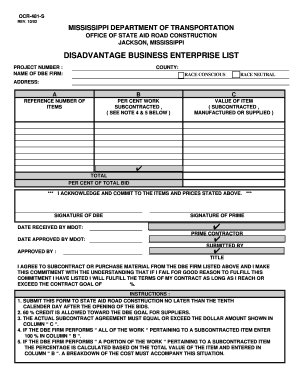
Get Ocr-481-s - Office Of State Aid Road Construction
How it works
-

Open form follow the instructions
-

Easily sign the form with your finger
-

Send filled & signed form or save
How to fill out the OCR-481-S - Office Of State Aid Road Construction online
Completing the OCR-481-S form is crucial for managing disadvantaged business enterprise submissions effectively. This guide provides a clear, step-by-step approach to ensure users can accurately fill out the form online and meet submission deadlines.
Follow the steps to accurately complete the OCR-481-S form online.
- Press the ‘Get Form’ button to access the OCR-481-S form and open it in your document editor.
- In the 'Project Number' field, enter the specific number assigned to your project. This number is essential for identifying the correct submission.
- In the 'Name of DBE Firm' section, input the official name of the disadvantaged business enterprise you are working with.
- Fill in the 'County' where the project is taking place. This information is vital for record-keeping and compliance.
- Select the appropriate option for 'Race Conscious' or 'Race Neutral'. Check the box corresponding to the strategy that applies to your project.
- In the address field, provide the full address of the DBE firm, including any relevant details to ensure accurate location information.
- Refer to the 'Reference Number of Items' column to specify any particular reference numbers related to subcontracted work.
- In the 'Per Cent Work Subcontracted' column, enter the percentage of work that is subcontracted to the DBE firm based on the guidelines provided.
- List the 'Value of Item (Subcontracted, Manufactured or Supplied)' in the relevant column, detailing the monetary value of the work.
- Calculate and enter the 'Total Per Cent of Total Bid', which summarizes the DBE's contribution to the overall project bid.
- Review the acknowledgment statement and ensure both 'Signature of DBE' and 'Signature of Prime' are written, along with their respective dates.
- Finally, save the form changes, and options to download, print, or share the completed document will be available for your convenience.
Take action today by completing the OCR-481-S form online to ensure timely submission.
How to Make a Graph? Choose a template. Pick from 100+ ready to use templates within PhotoADKing's online Graph Maker to create graphs and charts. ... Add or upload your data. Upload your own numbers in the editor or you can also upload your existing excel file to save time. ... Customize your charts. ... Download and share.