Loading
Form preview
  • US Legal Forms
  • Other Templates
  • More Forms
  • More Uncategorized Forms
  • Addendum To Enrollment Form For Child Care - Van Buren County ...

Get Addendum To Enrollment Form For Child Care - Van Buren County ...

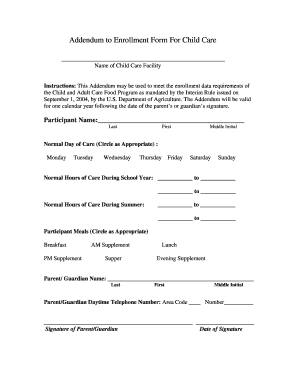
U.S. Department of Agriculture. The Addendum will be valid for one calendar year following the date of the parent's or guardian's signature. Participant Name: .

How it works

  1. Open form

    Open form follow the instructions

  2. Easily sign form

    Easily sign the form with your finger

  3. Share form

    Send filled & signed form or save

How to fill out the Addendum To Enrollment Form For Child Care - Van Buren County online

The Addendum To Enrollment Form For Child Care is crucial for ensuring compliance with the Child and Adult Care Food Program requirements. This guide aims to provide clear, step-by-step instructions for completing the form online, making the process accessible for all users.

Follow the steps to complete the form effectively.

  1. Click the ‘Get Form’ button to access the Addendum. This will open the document in a user-friendly format for your convenience.
  2. Begin by filling in the participant name section. Enter the last name, first name, and middle initial of the child who will be enrolled. Ensure the spelling is correct for official records.
  3. Next, indicate the normal days of care by circling the appropriate days from Monday through Sunday based on your needs.
  4. Provide the normal hours of care during the school year. Fill in the start and end times in the designated fields. Repeat the process for normal hours of care during the summer.
  5. Circle any meals that the participant will be receiving. Options include breakfast, lunch, supper, and various supplements. This information is vital for eligibility under the program.
  6. In the parent/guardian name section, enter the last name, first name, and middle initial of the parent or guardian responsible for the enrollment.
  7. Fill in the parent/guardian's daytime telephone number, ensuring to include the area code.
  8. The parent or guardian must then sign and date the form in the required sections to validate it. Make sure the date of signature is entered correctly.
  9. After completing the form, you can save changes, download, print, or share the Addendum for your records as necessary.

Complete your documents online today to ensure a smooth enrollment process.

Get form

Experience a faster way to fill out and sign forms on the web. Access the most extensive library of templates available.
Get form

Related content

Forms - Domestic Relations - One Court of Justice
​Index of SCAO-Approved Forms for Use in Domestic Relations Matters ... (6/17) If you...
Learn more
2020 May Minutes
May 22, 2020 at 7:00p.m. at the Van Buren County Extension office or by phone. Kisling...
Learn more
Patrick Leahy - Wikipedia
Patrick Joseph Leahy is an American politician serving as the senior United States senator...
Learn more

Related links form

APPLICATION FOR MILITARY SKILLS TEST WAIVER - Dmv De Premises Registration Form - Georgia Department Of Agriculture - Agr Georgia Juvenile Complaint Form Ga ASBESTOS EXCLUSION CERTIFICATION FORM (NEW ... - Archives Doe K12 Ga

Questions & Answers

Get answers to your most pressing questions about US Legal Forms API.

Contact support

Steps to writing a project charter Choose a project name. Identify the purpose, objective (goal), and project specification. Set a budget. Define deliverables. Assess scope and risks. Create a timeframe or milestones. List key stakeholders. Layout team roles and responsibilities.

Steps to writing a project charter Choose a project name. Identify the purpose, objective (goal), and project specification. Set a budget. Define deliverables. Assess scope and risks. Create a timeframe or milestones. List key stakeholders. Layout team roles and responsibilities.

A project charter is a formal short document that states a project exists and provides project managers with written authority to begin work. A project charter document describes a project to create a shared understanding of its goals, objectives and resource requirements before the project is scoped out in detail.

Noun The charter allows for unrestricted trading. Verb The city was chartered in 1837. The team chartered a plane.

What Are the Contents of a Project Charter? A project charter should always include an overview, an outline of scope, an approximate schedule, a budget estimate, anticipated risks, and key stakeholders. Each of these sections should be brief, but as thorough as possible.

There are four clear steps to creating your own project charter. Step 1: Understand key project goals and objectives. Identify the project vision and determine the scope of the project. ... Step 2: Define project organization. ... Step 3: Create an implementation plan. ... Step 4: List potential problem areas.

In 1215, the earliest famous example of a charter was the Magna Carta, which established the rights of the people of England.

Get This Form Now!

Use professional pre-built templates to fill in and sign documents online faster. Get access to thousands of forms.
Get form
If you believe that this page should be taken down, please follow our DMCA take down processhere.
Get Addendum To Enrollment Form For Child Care - Van Buren County ...
Get form
  • Adoption
  • Bankruptcy
  • Contractors
  • Divorce
  • Home Sales
  • Employment
  • Identity Theft
  • Incorporation
  • Landlord Tenant
  • Living Trust
  • Name Change
  • Personal Planning
  • Small Business
  • Wills & Estates
  • Packages A-Z
  • Affidavits
  • Bankruptcy
  • Bill of Sale
  • Corporate - LLC
  • Divorce
  • Employment
  • Identity Theft
  • Internet Technology
  • Landlord Tenant
  • Living Wills
  • Name Change
  • Power of Attorney
  • Real Estate
  • Small Estates
  • Wills
  • All Forms
  • Forms A-Z
  • Other Templates
  • Legal Hub
  • About Us
  • Help Portal
  • Legal Resources
  • Blog
  • Affiliates
  • Contact Us
  • Delete My Account
  • Site Map
  • Industries
  • Forms in Spanish
  • Localized Forms
  • State-specific Forms
  • Forms Kit
  • Real Estate Handbook
  • All Guides
  • Notarize
  • Incorporation services
  • For Consumers
  • For Small Business
  • For Attorneys
  • USLegal
  • FormsPass
  • pdfFiller
  • signNow
  • altaFlow
  • DocHub
  • Instapage
Form Packages
  • Adoption
  • Bankruptcy
  • Contractors
  • Divorce
  • Home Sales
  • Employment
  • Identity Theft
  • Incorporation
  • Landlord Tenant
  • Living Trust
  • Name Change
  • Personal Planning
  • Small Business
  • Wills & Estates
  • Packages A-Z
Form Categories
  • Affidavits
  • Bankruptcy
  • Bill of Sale
  • Corporate - LLC
  • Divorce
  • Employment
  • Identity Theft
  • Internet Technology
  • Landlord Tenant
  • Living Wills
  • Name Change
  • Power of Attorney
  • Real Estate
  • Small Estates
  • Wills
  • All Forms
  • Forms A-Z
  • Other Templates
Customer Service
  • Legal Hub
  • About Us
  • Help Portal
  • Legal Resources
  • Blog
  • Affiliates
  • Contact Us
  • Delete My Account
  • Site Map
  • Industries
  • Forms in Spanish
  • Localized Forms
  • State-specific Forms
  • Forms Kit
Legal Guides
  • Real Estate Handbook
  • All Guides
Prepared for you
  • Notarize
  • Incorporation services
Our Customers
  • For Consumers
  • For Small Business
  • For Attorneys
Our Sites
  • USLegal
  • FormsPass
  • pdfFiller
  • signNow
  • altaFlow
  • DocHub
  • Instapage
Social Media
Call us now toll free:
+1 833 426 79 33
As seen in:
© Copyright 1999-2026 airSlate Legal Forms, Inc. 17 Station Street, Ste. 203, Brookline, MA 02445
  • Your Privacy Choices
  • Terms of Service
  • Privacy Notice
  • Content Takedown Policy
  • Bug Bounty Program